
GPT Image 2 Restaurant Social Media Image Prompts for Weekly Content
Plan restaurant social media visuals with GPT Image 2 using content pillars, text-safe compositions, honest menu references, prompt variants, and a repeatable weekly review workflow.
Quick answer
Build the week around separate content jobs—dish spotlight, ingredient story, atmosphere, process, and announcement—then generate one text-free visual concept per job. Use real photography for exact dishes, portions, prices, people, and premises; use GPT Image 2 for controlled backgrounds, mood concepts, and clearly labeled illustrative posts.
Who this guide is for
Independent restaurants, cafes, bakeries, hospitality groups, social media managers, and agencies that need a repeatable stream of distinct post concepts without misrepresenting what guests will receive.
Recommended model
| Use case | Recommended model | Why |
|---|---|---|
| This workflow | GPT Image 2 for text-free restaurant creative concepts | A text-to-image workflow can quickly explore compositions, palettes, seasonal atmospheres, ingredient-led scenes, and copy-safe layouts before approved menu photography and editable copy are assembled. |
AIBase is an independent creative platform. Model names are shown only to identify supported underlying technologies and workflow choices.
Prompt template
Create a text-free [1:1 or 4:5] restaurant social media background for the content pillar [dish spotlight/ingredient story/atmosphere/process/announcement]. Audience: [local diner]. Visual concept: [one specific scene]. Main visual anchor: [location]. Leave clean negative space in [region] for editable copy. Palette and light: [verified brand direction]. This is [an illustrative concept/a background for approved dish photography], not proof of a real menu item or venue feature. No text, letters, numbers, logo, price, promotion, rating, review, delivery badge, person identity, exact branded packaging, invented dish, misleading portion, watermark, or border.
Step-by-step workflow
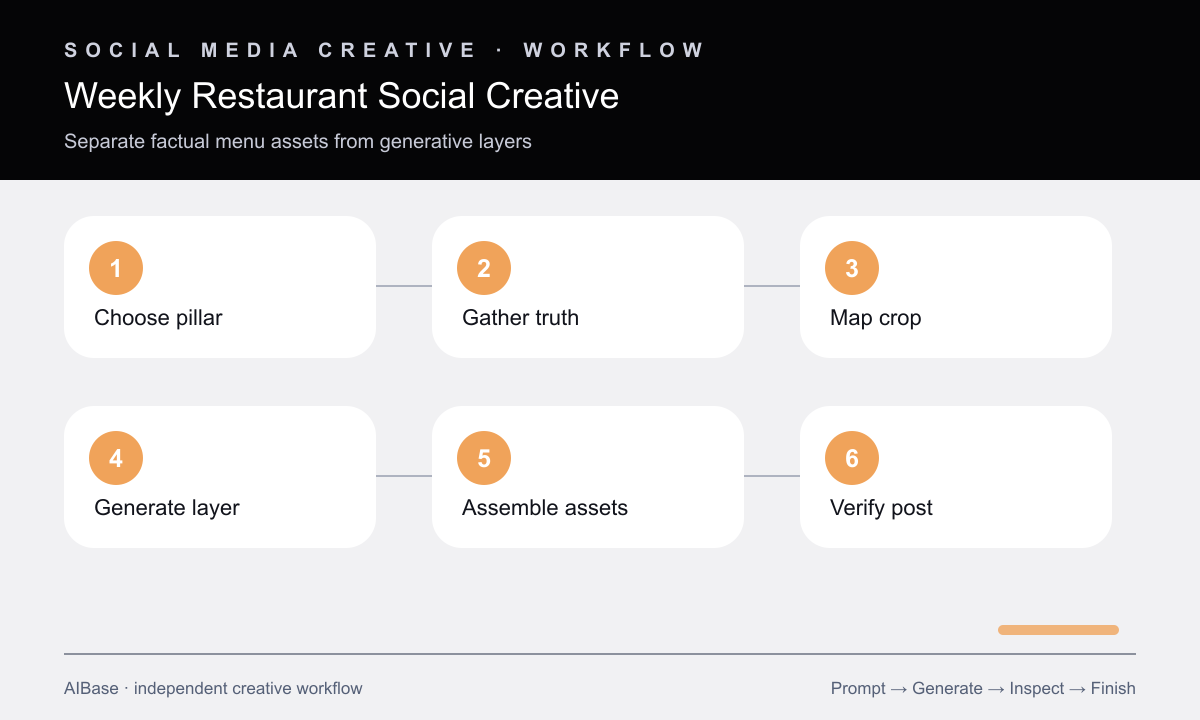
- Choose five weekly content pillars and assign each one a single objective, audience action, source of truth, and format before writing prompts.
- Separate factual assets—real dishes, prices, staff, venue, hours, allergens, and offers—from generative layers such as backgrounds or mood scenes.
- Create one crop template with protected zones for the platform interface, headline, logo, and required terms, keeping those elements editable.
- Generate three text-free concepts for one pillar by varying only the visual hook, then choose the direction that works without a caption.
- Composite approved dish photography or brand assets when factual accuracy matters, and add final copy, prices, and disclosures outside generated pixels.
- Review the assembled post against the real menu and destination page, label illustrative imagery when needed, and schedule only after owner verification.
Example prompt variants
- 4:5 ingredient-story background for a neighborhood bakery, scattered verified grain textures and one linen fold, warm early-morning side light, quiet upper-left copy space, no loaf, packaging, text, or health claim.
- Square weekend-atmosphere concept for a small cafe, abstract pools of amber window light across a clean wood table with one neutral ceramic cup silhouette, open right side for copy, no venue likeness, logo, menu item, or people.
- 4:5 seasonal announcement background for a family restaurant, restrained citrus color fields and paper-cut botanical shapes, centered lower visual weight, clean top copy zone, no dish, price, date, text, or promotional badge.
Quality checklist
- Each post has one content pillar, one message, one source of truth, and one intended action rather than a mixed weekly collage.
- Generated pixels contain no invented menu item, ingredient, portion, price, offer, rating, venue feature, staff member, or customer result.
- The focal area and copy-safe zone survive the actual 1:1 or 4:5 crop and remain readable under the platform interface.
- Approved photography, logo, copy, terms, and pricing remain editable and match the live menu, booking, or ordering destination.
- The final calendar varies visual hooks and content jobs while maintaining a recognizable palette and honest brand voice.
Mistakes to avoid
- Generating an idealized signature dish and publishing it as if it were an exact menu photograph.
- Baking prices, opening hours, offers, or logos into the image where errors are hard to correct.
- Using the same overhead food composition for every post and calling minor color changes a content strategy.
- Optimizing the background alone without checking the final crop, caption, destination link, and factual menu details.
Related AIBase pages
- Open GPT Image 2
- Use a social media image prompt template
- Create flat-lay product concepts
- Animate a real menu photo with Seedance
Practical next step
Open the most relevant AIBase generator, run one narrow prompt first, and save the best result before adding more constraints. The fastest way to improve output quality is to compare one variable at a time: subject, camera, background, lighting, then final polish.