
HappyHorse Professional Headshot Animation Prompts for Subtle Motion
Animate an authorized professional headshot with HappyHorse prompts that preserve identity, age, expression, clothing, background, consent, and a credible short loop.
Quick answer
For a credible professional loop, preserve the exact face, age, gaze, expression, hair, clothing, posture, crop, and background. Add only natural breathing, at most one blink, and a tiny head adjustment; keep the mouth closed and camera fixed unless the source was recorded for a separate consented talking-head workflow.
Who this guide is for
Professionals, recruiters, speaker bureaus, company teams, portfolio owners, and designers creating consented profile loops, speaker cards, internal directories, event pages, or subtle portfolio motion.
Recommended model
| Use case | Recommended model | Why |
|---|---|---|
| This workflow | HappyHorse image-to-video | A portrait-oriented reference workflow fits restrained head-and-shoulders motion where recognizable identity and the supplied professional presentation matter more than inventing a new person or scene. |
AIBase is an independent creative platform. Model names are shown only to identify supported underlying technologies and workflow choices.
Prompt template
Use the uploaded authorized professional headshot as the exact identity, apparent age, face shape, skin texture, eye color, gaze, expression, hair, facial hair, makeup, glasses, earrings, clothing, posture, crop, lighting, background, and camera reference. Create a [duration] locked-camera loop. Motion: subtle breathing, one natural blink between [time range], and at most a [tiny head adjustment] that returns near the first frame. Keep lips closed and expression unchanged. No face morph, beautification, age change, eye enlargement, skin smoothing, new smile, teeth, lip-sync, speech, gaze shift, hair movement, wardrobe change, body change, camera orbit, background motion, company logo, title, credential, text, or watermark.
Step-by-step workflow
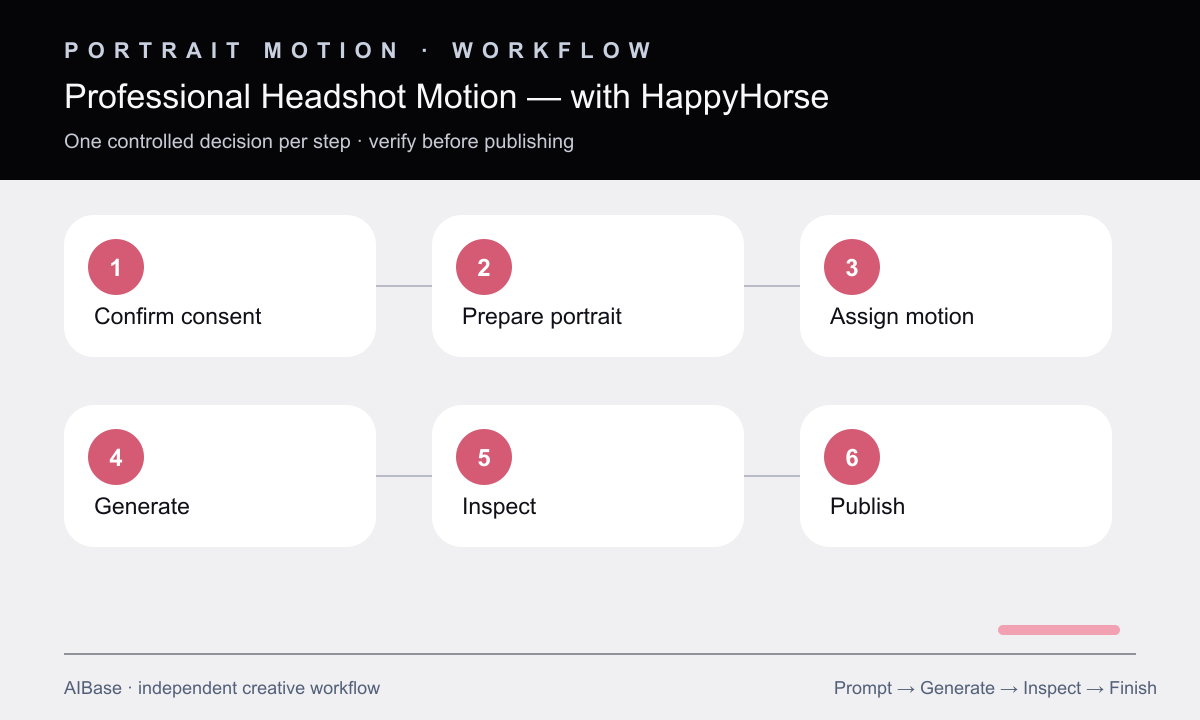
- Confirm the depicted person’s permission, intended platforms, duration, reuse period, employer or event context, and whether synthetic-motion disclosure is required.
- Select the sharpest authorized source and inspect eyes, mouth, glasses, hair edges, earrings, collar, shoulders, background lines, compression, and retouching before animation.
- Choose one primary micro-motion and one optional secondary motion, keeping the mouth, gaze, expression, camera, clothing, and background locked.
- Generate a four-to-six-second clip and review at normal and slow speed for identity, age, blink anatomy, pupils, teeth, glasses, hair, collar, shoulders, skin texture, and background drift.
- Reject any take that changes perceived emotion, professionalism, health, age, ethnicity, body, wardrobe, credentials, or employer association.
- Trim a clean loop, add real name and role as editable text, retain the original source, disclose synthetic motion where appropriate, and publish only within the approved scope.
Example prompt variants
- Five-second speaker headshot loop, one natural blink around three seconds and subtle breathing only, locked camera, preserve neutral confident expression, glasses, blazer, hair, crop, and gray background.
- Four-second team-directory portrait, tiny head adjustment of less than a few degrees then return, no blink or mouth motion, preserve exact gaze, curls, earrings, shirt collar, lighting, and background.
- Five-second portfolio profile loop, subtle breathing and one asynchronous blink, camera fixed, preserve freckles, beard line, sweater texture, shoulder angle, expression, and warm studio backdrop.
Quality checklist
- The person remains recognizable with the same apparent age, facial structure, gaze, expression, skin texture, hair, clothing, posture, crop, and background.
- Blink, breathing, and head motion are subtle, anatomically plausible, temporally separated, and free from mouth or pupil drift.
- Glasses, earrings, hair edges, teeth, facial hair, collar, shoulders, and background lines do not flicker, melt, duplicate, or change.
- Real name, role, company, credentials, event details, and contact information come from approved editable sources rather than generated pixels.
- Consent, reuse scope, privacy, disclosure, accessibility, file format, loop seam, and platform context are documented before publication.
Mistakes to avoid
- Asking a still headshot to speak, smile broadly, turn, and gesture without source footage designed for those movements.
- Using beautify, make younger, or more confident instructions that alter identity or professional presentation.
- Missing subtle eye, glasses, teeth, hairline, collar, or background flicker because the loop is reviewed only once at full speed.
- Publishing a synthetic professional likeness outside the person’s approved role, employer, event, platform, or reuse period.
Related AIBase pages
- Open HappyHorse
- Use subtle portrait animation prompts
- Animate vintage portraits carefully
- Create family photo motion
Practical next step
Open the most relevant AIBase generator, run one narrow prompt first, and save the best result before adding more constraints. The fastest way to improve output quality is to compare one variable at a time: subject, camera, background, lighting, then final polish.