
Nano Banana 2 Prompts to Remove Dust and Fingerprints from Product Photos
Remove isolated dust and fingerprints with Nano Banana 2 while preserving product geometry, labels, finish, reflections, lighting, and truthful surface texture.
Quick answer
Use a tight mask around each removable speck or print, name the real material beneath it, and protect all edges, labels, intentional texture, reflections, and shadows. Clean one defect class at a time. If a mark could be a coating feature, scratch, patina, or product condition detail, verify it against the approved sample before editing so cleanup does not misrepresent the item.
Who this guide is for
Ecommerce retouchers, catalog teams, product photographers, resale operators, and small brands cleaning an otherwise approved packshot of glass, metal, glossy plastic, screens, coated paper, or polished accessories.
Recommended model
| Use case | Recommended model | Why |
|---|---|---|
| This workflow | Nano Banana 2 image-to-image | A reference-led edit is useful for bounded surface cleanup when the original photo remains the truth source and the prompt clearly separates removable contamination from authentic material detail. |
AIBase is an independent creative platform. Model names are shown only to identify supported underlying technologies and workflow choices.
Prompt template
Use the uploaded authorized product photo as the exact source. Remove only the masked [dust specks / dry fingerprints / loose fibers] from the [specific surface]. Reconstruct the area as a continuation of the verified [glass / brushed metal / matte plastic / coated paper] texture, color, grain, highlight, and reflection visible immediately beside each mask. Preserve exact product silhouette, dimensions, seams, controls, logo, label text, spelling, finish, intentional texture, scratches that belong to the approved sample, lighting direction, reflections, contact shadow, background, camera, crop, and resolution. Do not polish the whole product, erase material grain, reshape an edge, rewrite text, remove an intentional mark, change color or gloss, invent hidden detail, add a beauty reflection, or edit outside the masks. Return one conservative cleanup for source comparison.
Step-by-step workflow
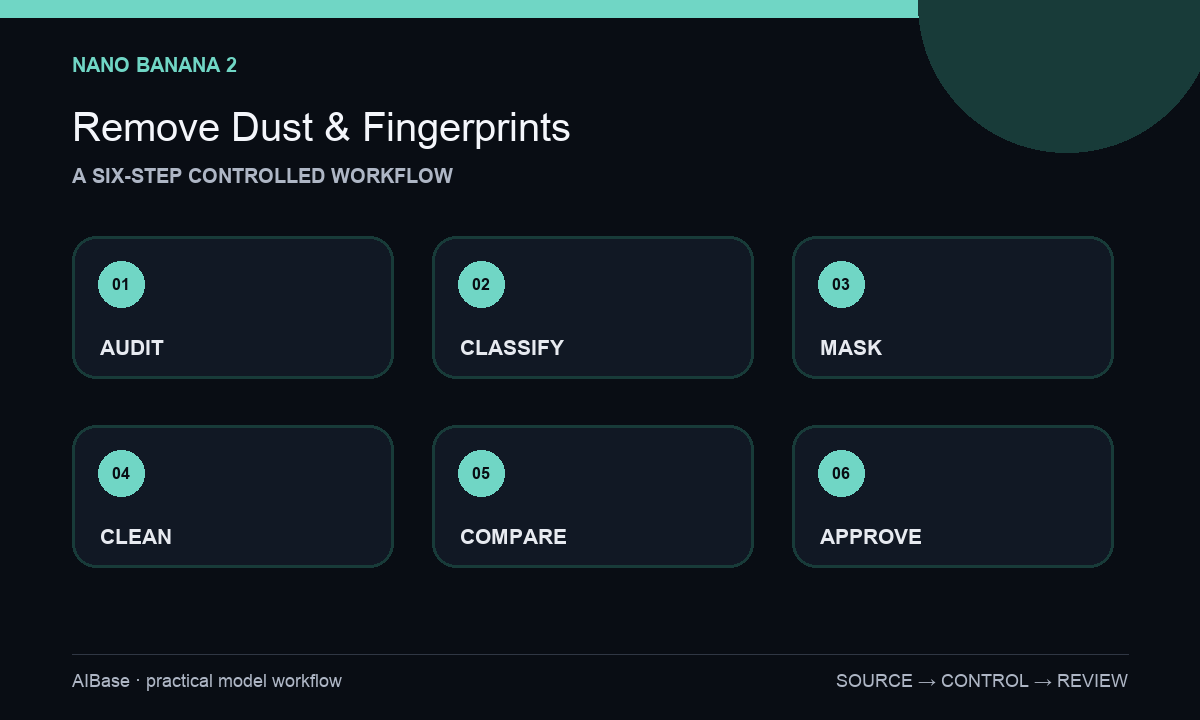
- Confirm the SKU, approved sample condition, image rights, and cleanup policy; retain the untouched master and any reference angles that distinguish dirt from real surface detail.
- Classify every candidate mark as removable dust, fingerprint, fiber, scratch, coating variation, seam, reflection, or uncertain detail; leave uncertain marks untouched until verified.
- Create separate tight feathered masks for contamination only, keeping masks away from labels, edges, ports, engraved details, and high-contrast reflection boundaries.
- Prompt for the exact verified substrate under each mask and run dust and fingerprints as separate passes when their reconstruction needs differ.
- Overlay result and source at 100 percent to inspect silhouette, finish, grain, micro-contrast, label pixels, reflections, shadows, mask halos, repeated texture, and accidental global smoothing.
- Export from the approved master, retain source-mask-result evidence, and record whether cleanup changes require retouched-image disclosure under marketplace or internal policy.
Example prompt variants
- Remove only the three masked dust specks from this matte black speaker grille, continue the verified fine coating texture, and preserve every perforation, edge, logo pixel, highlight, shadow, and unmasked surface mark.
- Clean only the masked dry fingerprints on the approved stainless-steel bottle, preserve the brushed grain direction, cylindrical reflection, printed label, cap seam, color, contact shadow, crop, and all unmasked pixels.
- Remove only the loose fibers identified on the plain glass screen area, preserve the bezel, displayed interface, glass tint, controlled reflection, corner radius, perspective, and authentic screen texture; no whole-screen polish.
Quality checklist
- Every removed mark was verified as temporary contamination rather than product damage, patina, coating variation, print, seam, or reflection.
- Product geometry, edges, ports, controls, labels, characters, colors, dimensions, and crop match the source exactly.
- Material grain, gloss, transparency, reflections, highlights, shadows, and micro-contrast continue naturally through each small mask.
- No waxy smoothing, cloned texture, halo, blur, invented highlight, global polish, or edit outside the authorized masks appears.
- The source, references, masks, prompt, output, reviewer, disclosure decision, and final export remain traceable.
Mistakes to avoid
- Prompting make the product perfectly clean and allowing the model to retouch the entire SKU.
- Treating every spot as dust without checking whether it is a real scratch, coating feature, engraved mark, or reflection.
- Masking across labels, sharp edges, screen content, or ports and forcing the model to reconstruct factual detail.
- Approving a thumbnail while subtle material smoothing, repeated grain, label drift, or reflection discontinuity remains visible at full size.
Related AIBase pages
- Open Nano Banana 2 image-to-image
- Remove product-photo glare
- Add a realistic product shadow
- Repair a crushed box corner
Practical next step
Open the most relevant AIBase generator, run one narrow prompt first, and save the best result before adding more constraints. The fastest way to improve output quality is to compare one variable at a time: subject, camera, background, lighting, then final polish.