
Seedance 2 Leathercraft Process Video Prompts from Workshop Photos
Animate authorized leathercraft workshop photos with Seedance 2 using one truthful hand action per shot while preserving tools, material, stitch order, and maker identity.
Quick answer
Start from an authorized workshop frame whose tool, hand position, material, and unfinished product are already correct. Request one small action—marking, cutting, edge burnishing, punching, saddle stitching, or brushing finish—without inventing the next construction state. Use real capture for steps that prove craftsmanship, safety, material origin, or product durability; generated motion is supporting illustration, not documentary evidence.
Who this guide is for
Leather studios, independent makers, craft educators, ecommerce teams, and social producers turning approved process photos into short atmospheric clips for reels, product pages, or campaign transitions.
Recommended model
| Use case | Recommended model | Why |
|---|---|---|
| This workflow | Seedance 2.0 image-to-video | A source-led motion workflow can add controlled hand and tool movement to a still workshop image when each shot is short, visually verifiable, and limited to one craft action. |
AIBase is an independent creative platform. Model names are shown only to identify supported underlying technologies and workflow choices.
Prompt template
Animate the uploaded authorized leathercraft workshop image as the exact first frame. Preserve the maker's identity if visible, hand anatomy and grip, [tool], leather piece shape, hide grain, color, cut edges, hole count and spacing, stitch path, thread color, hardware, pattern, bench marks, surrounding tools, light, camera, crop, and current construction stage. Motion: [one small verified action] over [3-5 seconds], with physically plausible contact between hand, tool, and leather. Camera [locked / one slow move], stable final second. Do not add or remove holes, stitches, cuts, hardware, logos, scars, tools, fingers, finished components, sparks, smoke, unsafe grip, accelerated transformation, reversed process, material claim, text, or watermark.
Step-by-step workflow
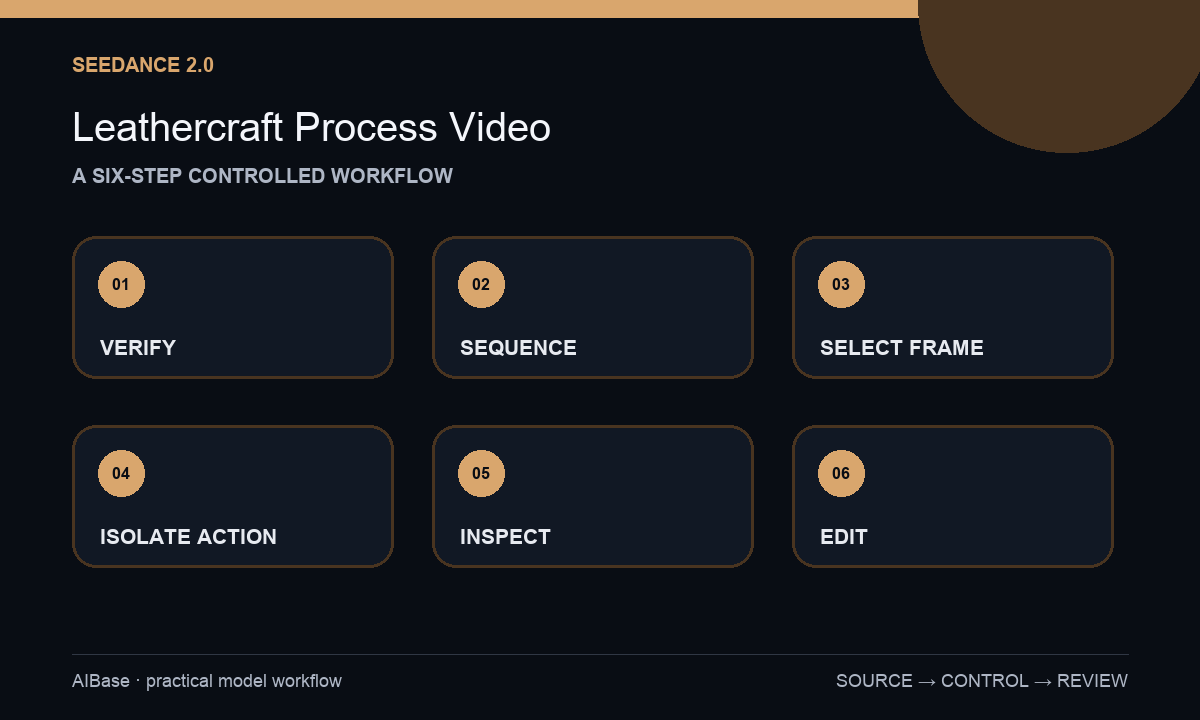
- Confirm image rights, maker consent, product version, real process order, tools, materials, safety guidance, and which claims require documentary footage rather than generated illustration.
- Map a truthful shot sequence and label the exact before-state and after-state for marking, cutting, punching, stitching, edge work, hardware, finishing, and final reveal.
- Choose a source frame with clear hands, tool contact, leather boundary, hole or stitch pattern, and enough margin for the intended crop; avoid ambiguous overlaps.
- Generate one three-to-five-second action per shot with modest amplitude, locked or slow camera, and no request to complete an entire construction stage.
- Inspect every frame for fingers, grip, blade or needle path, tool count, hole spacing, stitch order, thread continuity, hardware, leather grain, bench objects, and final-frame stability.
- Edit only approved clips into process order, label generated motion when context could imply documentation, and add exact captions, product facts, safety notes, and audio in post.
Example prompt variants
- Four-second locked close-up from the approved frame: the maker draws the edge beveler once along the visible leather edge, preserve hand grip, tool shape, edge path, hide grain, bench scratches, and every surrounding object; no new cut, finger, or finished polish.
- Three-second saddle-stitch detail: the two existing needles make one small opposing pull through the already visible hole, preserve exact hole count, stitch direction, thread color, hands, leather layers, clamp, and camera; do not add a row of stitches.
- Five-second edge-finishing shot: the cloth makes one short controlled pass over the already prepared edge, subtle surface sheen changes only at contact, preserve product shape, grain, hardware, hands, tools, lighting, and unfinished areas.
Quality checklist
- Tool, hand, material, contact point, construction state, and motion direction agree with the verified real process.
- Hands and fingers remain anatomical, grips stay safe, and blades, punches, needles, heat, or chemicals do not behave impossibly.
- Leather grain, edges, holes, stitches, thread, hardware, pattern pieces, tools, bench, maker identity, and crop remain stable.
- The clip does not invent craftsmanship proof, material origin, handmade status, durability, speed, waste, or safety performance.
- Sources, shot map, prompts, outputs, factual review, disclosure decision, captions, and final edit remain traceable.
Mistakes to avoid
- Requesting cut, punch, stitch, dye, assemble, and finish in one clip and creating impossible process continuity.
- Using a source with hidden fingers or tool contact and asking the model to guess anatomy and mechanics.
- Letting hole count, stitch direction, thread color, hardware, pattern shape, or product stage change between frames.
- Presenting generated workshop motion as proof of actual labor, sourcing, safety, sustainability, or product construction.
Related AIBase pages
- Open Seedance 2.0
- Animate handmade product processes
- Animate pottery processes
- Create product photo-to-video clips
Practical next step
Open the most relevant AIBase generator, run one narrow prompt first, and save the best result before adding more constraints. The fastest way to improve output quality is to compare one variable at a time: subject, camera, background, lighting, then final polish.