
Seedream 5.0 Lite Real Estate Flyer Background Prompts with Listing-Safe Layouts
Draft text-free real estate flyer backgrounds with Seedream 5.0 Lite while keeping listing photos, agent details, prices, features, disclosures, and fair-housing review controlled.
Quick answer
Generate only a text-free layout background and decorative system. Place authorized listing photos, exact address, price, dates, features, agent identity, brokerage marks, required disclosures, QR destination, and accessibility text in a design file. Do not generate a prettier fictional property, neighborhood, view, renovation, resident, or amenity that viewers could mistake for the listing.
Who this guide is for
Real estate agents, brokerages, property marketers, designers, and local agencies producing open-house flyers, new-listing posts, window cards, email graphics, or printable handouts.
Recommended model
| Use case | Recommended model | Why |
|---|---|---|
| This workflow | Seedream 5.0 Lite for fast text-free background and layout-direction drafts | Fast variation suits early flyer exploration when factual listing content stays in authorized photos and editable typography rather than generated pixels. |
AIBase is an independent creative platform. Model names are shown only to identify supported underlying technologies and workflow choices.
Prompt template
Create a text-free [portrait flyer / square social card] background system for a verified [property type] listing. Use [palette and material motif] with reserved editable zones for one authorized hero photo, [number] detail photos, address and status, price, open-house date and time, three verified features, agent and brokerage block, disclosure, and QR code. Keep strong hierarchy, print-safe margins, mobile-safe center, and high-contrast copy areas. Do not depict a property, room, view, amenity, person, neighborhood, map, logo, word, number, price, badge, QR code, or housing claim. Return a clean background plate only.
Step-by-step workflow
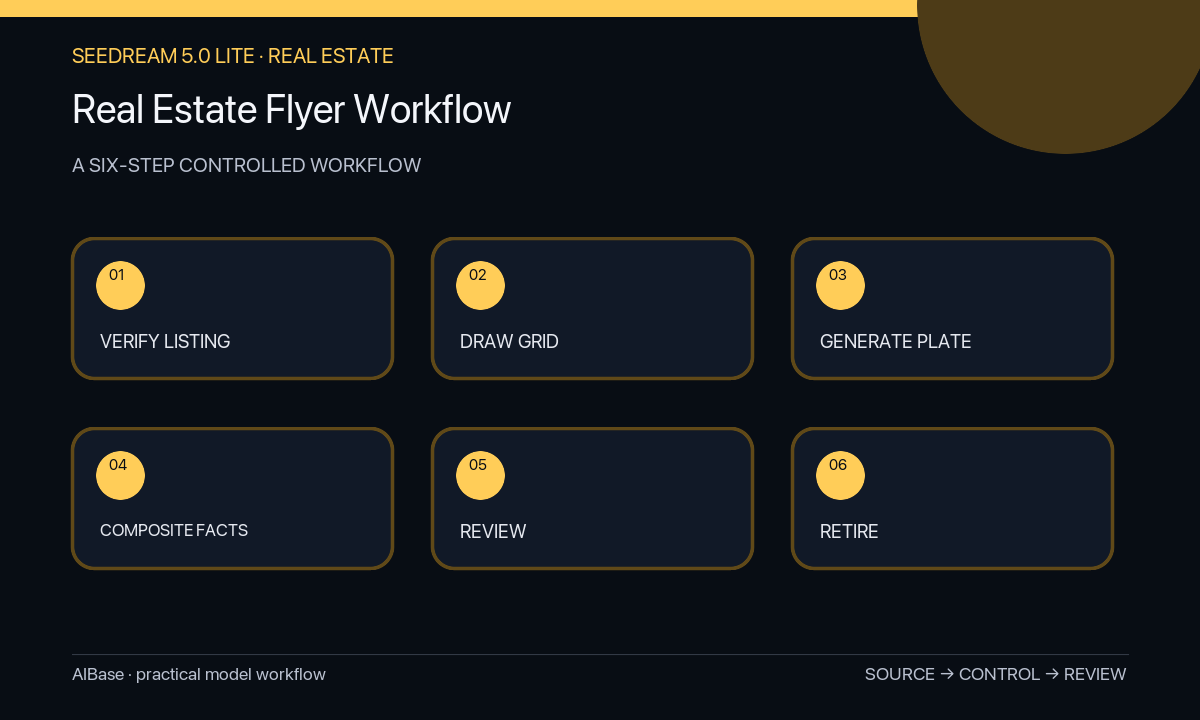
- Confirm listing authorization, current status, address display rules, price, event date, verified features, photo rights, agent and brokerage details, required disclosures, and destination URL.
- Choose the channel and draw a grid with exact photo ratios, copy hierarchy, legal block, QR area, print bleed, mobile crop, and accessible contrast targets.
- Generate three text-free background systems that vary palette or motif but contain no building, room, landscape, map, person, logo, symbol, or readable character.
- Composite only authorized current listing photos and exact data, using official brand assets and an editable type layer for every factual field.
- Review for photo alteration, stale status, misleading crop, feature mismatch, prohibited or exclusionary wording, disclosure legibility, QR destination, print safety, and mobile readability.
- Export channel-specific files, archive the listing-data version and approvals, and withdraw or update every flyer when price, status, date, agent, or destination changes.
Example prompt variants
- Text-free portrait open-house flyer background, warm cream and charcoal editorial grid, one large photo frame and three small detail frames, clear date and agent zones, print-safe margins, no property image, key icon, map, logo, word, or number.
- Text-free square new-listing social background, restrained navy and sand blocks, centered hero-photo window, short feature zone and bottom brokerage strip, mobile-safe hierarchy, no house silhouette, neighborhood cue, badge, text, or person.
- Text-free luxury property window-card background, quiet stone palette and thin geometric rules, wide authorized-photo zone and high-contrast information column, no invented architecture, view, foliage, amenity, gold seal, logo, or copy.
Quality checklist
- Every property photo, address, price, status, date, feature, measurement, contact, logo, disclosure, and link is current and approved.
- The generated plate contains no fictional property evidence, neighborhood signal, person, amenity, map, text, number, logo, or claim.
- Photo frames preserve honest context and do not crop away condition, adjacency, scale, or other material listing information.
- Typography contrast, reading order, font size, print margins, mobile crop, alt text, QR code, and disclosure placement pass review.
- The flyer can be corrected or retired quickly because facts and branding remain editable layers tied to a listing version.
Mistakes to avoid
- Generating an aspirational house or interior and allowing viewers to assume it is the advertised property.
- Baking the price, address, date, agent details, QR code, status, or features into generated pixels.
- Using lifestyle people or neighborhood imagery that creates unsupported demographic or amenity implications.
- Leaving old flyers live after a price, status, event, agent, disclosure, or destination changes.
Related AIBase pages
- Open Seedream 5.0 Lite
- Replace a real estate photo sky
- Create listing photo-to-video clips
- Create real estate video concepts
Practical next step
Open the most relevant AIBase generator, run one narrow prompt first, and save the best result before adding more constraints. The fastest way to improve output quality is to compare one variable at a time: subject, camera, background, lighting, then final polish.