
Nano Banana 2 Sky Replacement Prompts for Real Estate Photos
Replace a flat sky in a real estate photo with Nano Banana 2 while preserving the property, view, shadows, weather truth, window reflections, and listing accuracy.

Quick answer
Use an authorized property photo, protect everything below and around the skyline, and request a plausible sky that matches the recorded time, season, weather, light direction, and exposure. Keep the edit bounded to visible sky pixels; if the new sky requires changed shadows, wet surfaces, foliage, or window reflections, choose a closer match instead of rewriting the property.
Who this guide is for
Real estate photographers, listing agents, property managers, hospitality teams, and retouchers improving a dull but accurate exterior image without changing the building, land, view, neighborhood, or material facts.
Recommended model
| Use case | Recommended model | Why |
|---|---|---|
| This workflow | Nano Banana 2 image-to-image | Sky replacement is a narrow reference-led edit where the uploaded photograph must stay authoritative and only a clearly bounded region should change. |
AIBase is an independent creative platform. Model names are shown only to identify supported underlying technologies and workflow choices.
Prompt template
Use the uploaded authorized property photo as the exact source. Replace only the visible [gray/blank] sky above the existing skyline with a natural [weather and cloud description] sky consistent with the verified [time, season, location, and light direction]. Preserve every building edge, roofline, chimney, antenna, tree branch, mountain, horizon, window, reflection, power line, fence, ground surface, landscaping, vehicle, person, crop, perspective, exposure, shadow, and color below the sky boundary. Keep the existing light and weather evidence unchanged. Do not add or remove property features, improve the view, move vegetation, erase wires, change windows, relight the scene, create a dramatic sunset, add birds, text, watermark, or misleading amenity.
Step-by-step workflow
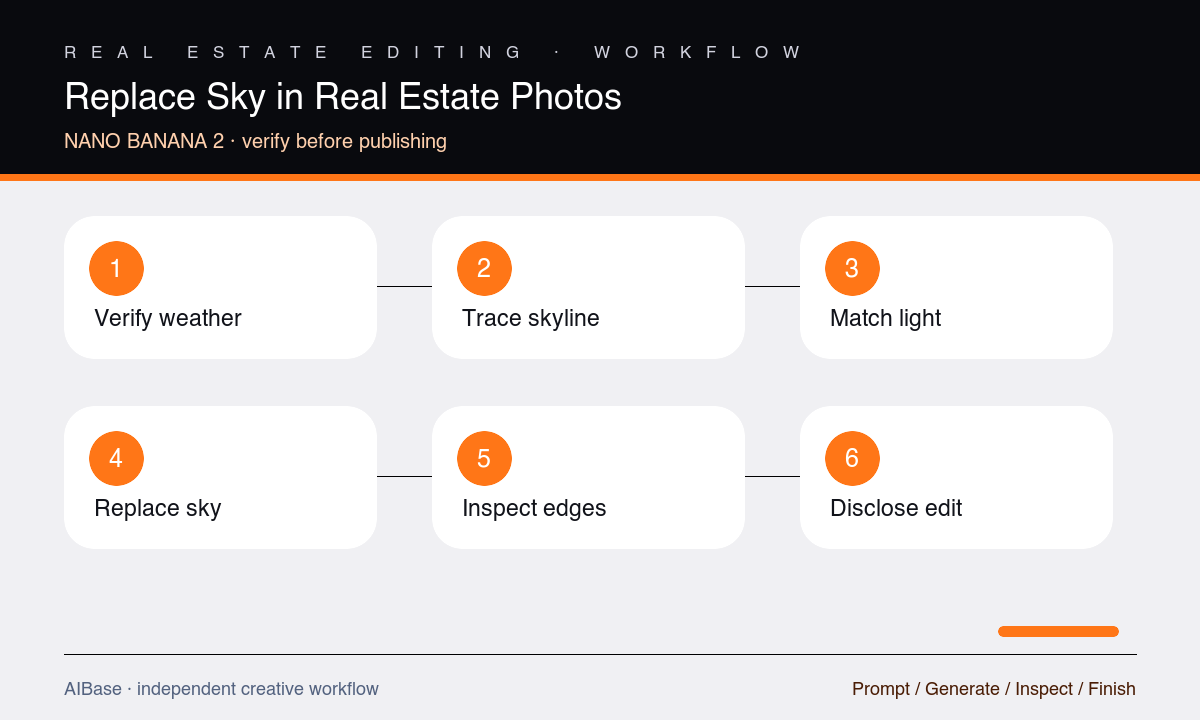
- Confirm the image rights and record the actual property, capture date, season, weather, and any listing rules about digitally altered imagery.
- Trace the skyline at full resolution, including branches, cables, railings, roof details, reflections, and narrow gaps where masking errors are easy to miss.
- Choose a replacement sky close to the source exposure and light direction so the building, shadows, foliage, and windows do not need secondary edits.
- Request only the sky change, generate a restrained version, and compare it with the source using an edge overlay rather than judging the thumbnail.
- Inspect rooflines, fine branches, wires, window reflections, halos, color spill, cloud scale, horizon depth, and the consistency of light across the scene.
- Keep the original and edited files together, disclose digital sky replacement where required, and publish the original when weather is material to the listing.
Example prompt variants
- Replace only the pale overcast sky with soft broken morning cloud, preserving the exact roof, chimney, bare branches, overhead cable, window reflections, cool light, damp driveway, and all property details.
- Replace only the clipped white sky above the apartment roofline with a lightly clouded blue sky matching midday neutral light; preserve balconies, antennas, trees, neighboring buildings, shadows, perspective, and crop.
- Replace only the flat sky behind the verified mountain-view rental with subtle late-afternoon clouds that match the existing warm side light; preserve the exact ridge, trees, railing, glass reflections, building, and view scale.
Quality checklist
- Rooflines, branches, wires, antennas, horizons, reflections, and negative spaces match the original pixel-for-pixel outside the intended sky mask.
- Cloud scale, color temperature, horizon brightness, light direction, and exposure are plausible for the documented place, season, and time.
- Buildings, land, landscaping, neighboring context, views, amenities, people, vehicles, shadows, and wetness remain truthful and unchanged.
- There are no halos, clipped branches, blue spill, repeated clouds, artificial gradients, reflection mismatches, or dramatic weather unsupported by the scene.
- The original, edit, prompt, disclosure decision, and reviewer approval remain available with the listing asset.
Mistakes to avoid
- Choosing a vivid sunset for a flat midday photo and then forcing the model to relight the whole property.
- Treating trees, cables, mountains, glass reflections, and small roof details as expendable parts of the mask.
- Letting sky replacement remove neighboring buildings, utility infrastructure, weather evidence, or an obstructed view.
- Publishing an altered listing image without retaining the source or checking local disclosure and advertising requirements.
Related AIBase pages
- Open Nano Banana 2 image-to-image
- Change a background while keeping the subject
- Fix product photo perspective
- Create real estate virtual staging concepts
Practical next step
Open the most relevant AIBase generator, run one narrow prompt first, and save the best result before adding more constraints. The fastest way to improve output quality is to compare one variable at a time: subject, camera, background, lighting, then final polish.