
Veo 3.1 Pro Architecture Studio Brand Film Prompts Without Fake Projects
Plan cinematic architecture-studio brand film plates with Veo 3.1 Pro while protecting project attribution, authorship, clients, sites, people, drawings, and performance claims.
Quick answer
Use authorized photography, drawings, models, interviews, and site footage whenever a shot identifies a real project or proves design outcomes. Veo 3.1 Pro can explore abstract material, light, model-making, or transition plates, but generated buildings must not enter a portfolio as completed work. Separate atmosphere from evidence, label conceptual imagery where ambiguity remains, and keep every project credit and performance statement tied to approved sources.
Who this guide is for
Architecture practices, interior studios, landscape teams, design agencies, and portfolio editors creating a manifesto film, recruitment piece, competition introduction, website reel, or studio presentation.
Recommended model
| Use case | Recommended model | Why |
|---|---|---|
| This workflow | Veo 3.1 Pro for cinematic abstract studio plates, with authorized sources for real projects and people | A quality-focused video workflow suits deliberate material and light studies, while source routing prevents generated architecture from becoming false portfolio evidence. |
AIBase is an independent creative platform. Model names are shown only to identify supported underlying technologies and workflow choices.
Prompt template
Create a cinematic [4-7 second] text-free illustrative plate for an architecture studio brand film. Purpose: [abstract design principle / material transition / process mood], not a real project or documentary event. Subject: [generic physical model fragment / material sample / geometric light study], one motion: [specific], camera [one movement], lens and crop [specific], light and palette [specific], stable final frame. Do not depict or imply a completed commission, identifiable building, client, site, city, architect, employee, resident, drawing, model, permit, certification, award, budget, schedule, energy result, sustainability outcome, accessibility performance, logo, project name, text, or watermark.
Step-by-step workflow
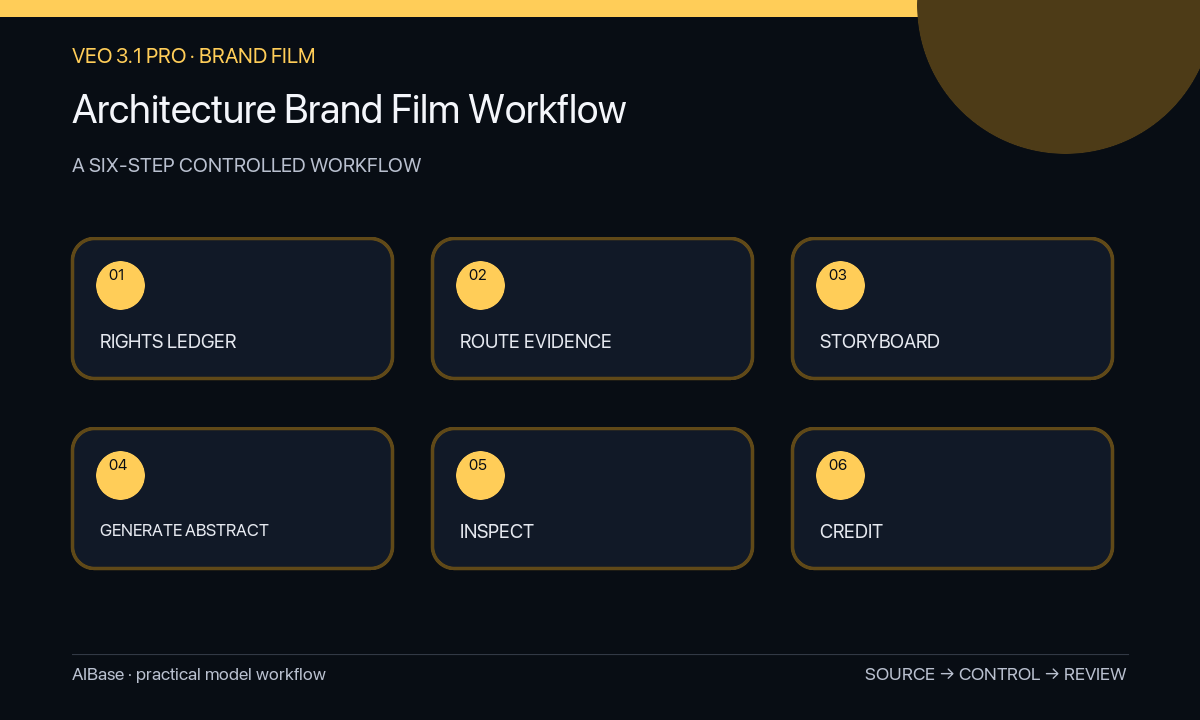
- Create a rights and facts ledger for each project, client, collaborator, photographer, person, drawing, model, site, award, metric, quote, usage territory, and expiration date.
- Write the film narrative, then label every beat as studio value, verified project evidence, approved process documentation, interview, controlled graphic, licensed stock, or synthetic atmosphere.
- Route real projects, authorship, sites, people, drawings, models, construction, occupancy, and performance outcomes to authorized media only.
- Generate selected abstract plates with generic non-identifiable forms, one physical motion, text-free framing, and no resemblance to a named project or site.
- Review every frame for accidental project lookalikes, impossible structure, misleading material behavior, unsafe studio action, people, drawings, readable text, marks, and false cause-and-effect beside narration.
- Add exact credits, captions, project facts, metrics, and disclosures in post; archive sources, prompts, approvals, final cut, publication scope, and correction path.
Example prompt variants
- Five-second macro plate of generic card model planes as one narrow band of daylight moves across them, slow lateral camera, quiet limestone and graphite palette, no recognizable building, drawing, person, logo, dimension, or project claim.
- Four-second abstract material study, one unlabeled timber sample rotates slightly beside stone and metal swatches on a neutral table, locked composition, no supplier mark, certified source, finished interior, hand, or text.
- Six-second nonliteral spatial transition through simple translucent geometric screens, one slow forward move, soft diffuse light and stable final frame, no habitable building, city, landscape, code claim, accessibility promise, or project identity.
Quality checklist
- Every real project, client, collaborator, person, photograph, drawing, model, site, quote, award, and metric is authorized and credited correctly.
- Synthetic plates remain abstract, non-identifiable, non-evidentiary, and clearly separated from portfolio or documentary material.
- Narration and shot order do not imply a generated building was designed, permitted, built, occupied, awarded, or measured by the studio.
- Materials, light, motion, structure, camera, captions, credits, disclosure, audio, and final-frame stability pass discipline and accessibility review.
- Rights ledger, sources, prompts, outputs, edits, approvals, publication scope, expiration, and correction path remain traceable.
Mistakes to avoid
- Generating a spectacular building and cutting it into the portfolio montage as if it were completed studio work.
- Using unapproved drawings, models, client sites, employee likenesses, photographer images, or collaborator work as generation inputs.
- Pairing abstract footage with narration about measured energy, community, accessibility, budget, or delivery outcomes and implying proof.
- Omitting project credits, conceptual-image disclosure, usage limits, or a correction process because the film feels atmospheric.
Related AIBase pages
- Open Veo 3.1 Pro
- Create architecture exterior concepts
- Create real estate video concepts
- Build hotel brand-film shots
Practical next step
Open the most relevant AIBase generator, run one narrow prompt first, and save the best result before adding more constraints. The fastest way to improve output quality is to compare one variable at a time: subject, camera, background, lighting, then final polish.