
AI Image Prompt Template for Landing Page Hero Backgrounds
Use a reusable AI image prompt template for landing page hero backgrounds with message-fit metaphors, copy-safe zones, responsive crops, editable UI, and conversion-focused checks.
Quick answer
A useful hero-background prompt starts with the page promise and one visual metaphor, then defines the focal zone, headline and CTA safe area, desktop and mobile crops, contrast, palette, and exclusions. Generate the background without copy, buttons, UI, logos, or product claims; assemble factual content in HTML and test the complete page at real breakpoints.
Who this guide is for
Founders, growth teams, product marketers, designers, agencies, and developers creating landing-page hero backgrounds for SaaS, ecommerce, events, services, lead magnets, and campaign pages.
Recommended model
| Use case | Recommended model | Why |
|---|---|---|
| This workflow | Seedream 5.0 Lite for broad background variants; GPT Image 2 for a tightly specified scene | Both text-to-image routes can explore visual metaphors and composition, while the best choice depends on whether the task values fast breadth or a more bounded scene brief. |
AIBase is an independent creative platform. Model names are shown only to identify supported underlying technologies and workflow choices.
Prompt template
Create a text-free landing-page hero background for [offer] aimed at [audience]. Verified page promise: [one concise outcome without guarantee]. Visual metaphor: [one concrete scene that supports the promise]. Format: wide [desktop ratio] with a mobile-safe center crop. Place the focal subject in [region] and reserve a calm high-contrast area in [region] for an HTML headline, supporting copy, and CTA. Palette: [brand-safe colors]. Lighting and mood: [direction]. Detail should decrease behind the copy zone. No text, letters, numbers, logo, button, navigation, form, dashboard, browser frame, fake interface, chart, testimonial, rating, badge, product claim, watermark, border, or crucial detail near crop edges.
Step-by-step workflow
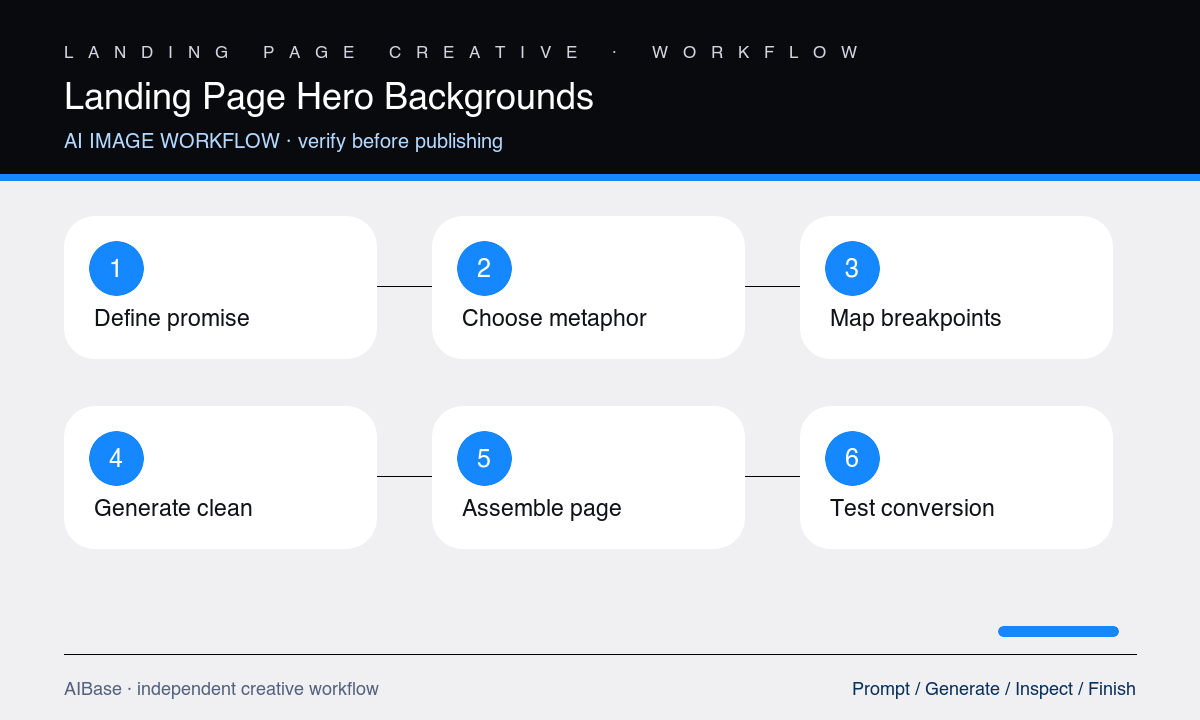
- Write the page source of truth: audience, one promise, offer, proof, CTA, product reality, brand constraints, target breakpoints, performance budget, and approval owner.
- Choose one visual metaphor that makes the promise easier to understand without inventing features, outcomes, interfaces, customers, data, or social proof.
- Map desktop and mobile focal zones, headline width, supporting copy, CTA, navigation, contrast overlay, and safe margins before generating.
- Generate three text-free directions by changing only the metaphor or subject placement, then place real headline and CTA blocks over each at target sizes.
- Select the composition that supports message hierarchy, export responsive crops, and implement copy, buttons, logo, product UI, and accessibility as native page elements.
- Test the assembled hero at real breakpoints for readability, crop, loading, cumulative layout shift, contrast, CTA clarity, and message-to-destination consistency.
Example prompt variants
- Wide SaaS workflow hero background with a small system of translucent modules converging into one clear path on the right, deep charcoal and electric apricot, calm dark left copy zone, mobile-safe center, no interface, text, or charts.
- Wide sustainable home-goods hero with one sculptural recycled-paper landscape and a verified generic product pedestal on the left, warm daylight, quiet cream right copy area, mobile center crop, no product, leaf badge, text, or claim.
- Wide expert-service landing hero with layered editorial frames opening toward a bright focal horizon on the right, muted navy and sand palette, clean left headline and CTA zone, no person, testimonial, certificate, logo, or text.
Quality checklist
- The visual metaphor supports the verified page promise without inventing a product feature, result, interface, customer, statistic, endorsement, or proof point.
- Headline, supporting copy, CTA, navigation, logo, and focus order remain native, editable, accessible page elements rather than generated pixels.
- Focal subject, negative space, contrast, and visual hierarchy work at every actual desktop and mobile crop without hiding essential content.
- The optimized image meets the page performance budget, loads without layout shift, and has a meaningful alt-text or decorative treatment decision.
- The complete hero communicates audience, offer, benefit, and next action clearly and matches the destination content below the fold.
Mistakes to avoid
- Prompting the full headline, CTA button, logo, dashboard, customer quote, and chart into one attractive but uneditable hero image.
- Choosing a generic glowing object or abstract gradient that has no relationship to the page promise or audience problem.
- Designing for one desktop screenshot and discovering the focal subject or copy-safe zone disappears on mobile.
- Optimizing visual novelty while ignoring contrast, reading order, page speed, accessibility, CTA clarity, and message consistency.
Related AIBase pages
- Open Seedream 5.0 Lite
- Open GPT Image 2
- Create Shopify hero banner concepts
- Use social media image prompt templates
Practical next step
Open the most relevant AIBase generator, run one narrow prompt first, and save the best result before adding more constraints. The fastest way to improve output quality is to compare one variable at a time: subject, camera, background, lighting, then final polish.