
Best AI Workflow for Shopify Collection Launch Creative
Route collection heroes, coordinated product scenes, ratio backgrounds, and short motion across AIBase-supported models while keeping SKUs, inventory, prices, reviews, and claims truthful.

Quick answer
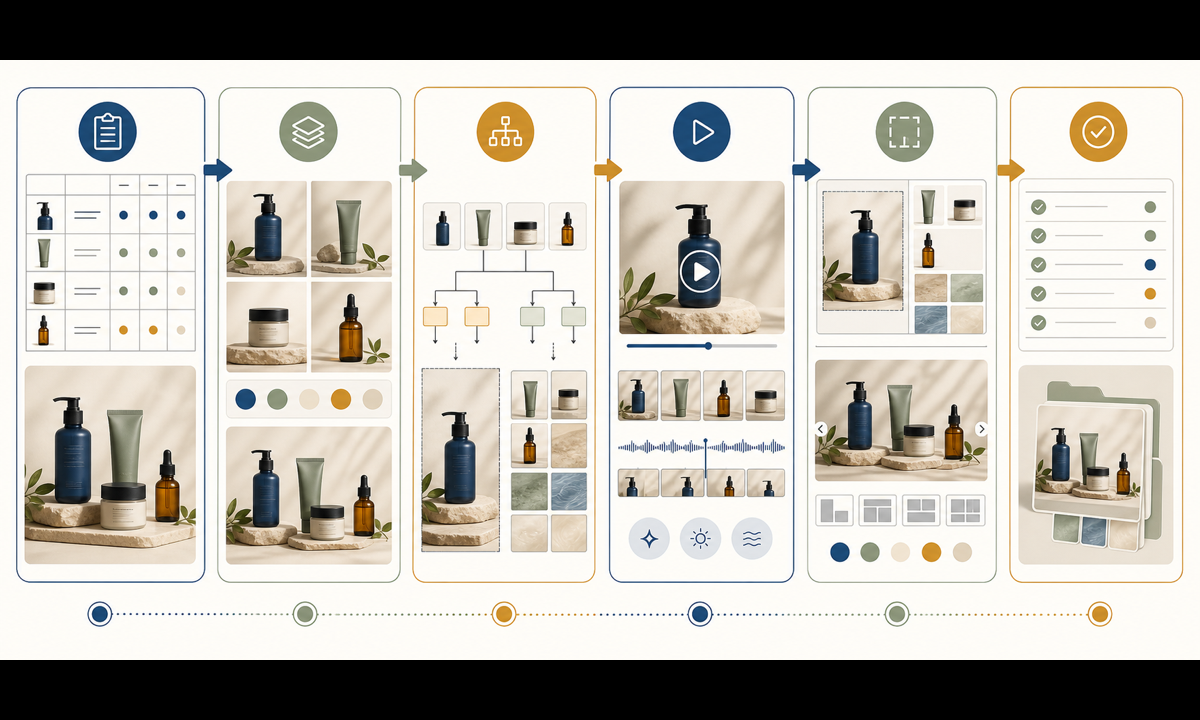
Start with a collection truth sheet covering included SKUs, variants, dimensions, materials, availability, price rules, sale terms, launch regions, claims, photography rights, and destination URLs. Use GPT Image 2 for text-free concept directions, Nano Banana Pro for reference-led coordinated product scenes, Seedream 5.0 Lite for fast crop-safe backgrounds, Seedance 2 for one bounded movement in an approved product still, and Veo 3.1 Fast for generic transitions. Assemble real product plates, titles, prices, reviews, badges, inventory, terms, disclosures, and links in editable Shopify or design layers.
Who this guide is for
Shopify merchants, ecommerce teams, DTC brands, agencies, photographers, and designers launching a new collection across storefront, email, social, paid placements, and short video.
Recommended model
| Use case | Recommended model | Why |
|---|---|---|
| This workflow | A routed AIBase-supported stack by collection asset | Concepts, multi-product reference scenes, ratio backgrounds, source-led motion, and generic transitions need different controls; routing reduces drift while merchandising facts remain authoritative. |
AIBase is an independent creative platform. Model names are shown only to identify supported underlying technologies and workflow choices.
Prompt template
Collection-launch asset job: [text-free hero concept / approved-reference product scene / crop-safe background / source-led micro-animation / generic transition]. Collection mood: [specific], channel and ratio: [specific], safe zones: [title / price / terms / CTA]. Preserve exact approved product SKU, variant, geometry, material, color, hardware, scale, included parts, contact, and shadow when references are used. No invented product, variant, bundle, person, storefront UI, review, rating, bestseller badge, stock, scarcity, discount, price, shipping, return term, guarantee, material claim, certification, word, number, logo, or watermark.
Step-by-step workflow
- Freeze included SKUs and variants, dimensions, materials, colors, included parts, availability, price and sale rules, claims, reviews, rights, markets, dates, and destination URLs.
- Inventory approved packshots, multi-angle references, detail plates, collection relationships, crops, channel specs, and factual merchandising content.
- Route text-free concept exploration to GPT Image 2, reference-led coordinated product scenes to Nano Banana Pro, and crop-safe background families to Seedream 5.0 Lite.
- Use Seedance 2 only for one bounded motion in an authorized product still and Veo 3.1 Fast for generic text-free hooks or transitions.
- Assemble real product plates, collection title, SKU links, prices, availability, reviews, badges, terms, disclosures, alt text, tracking, and CTA in editable masters and Shopify content.
- Test product fidelity, mobile crops, accessibility, localization, inventory, price, sale dates, links, structured data, page speed, playback, analytics, rollback, and campaign expiry.
Example prompt variants
- GPT Image 2: text-free wide collection hero concept with modular cream, sage and cobalt plinths for home accessories, clear center copy zone, no product, room, price, badge, review or word.
- Nano Banana Pro: arrange the authorized vase, folded textile and lamp references as a coordinated studio trio, preserve every SKU, color, material, proportions and hardware, no extra product, room claim, price or text.
- Seedance 2: animate only a slight existing linen-edge movement in the authorized collection still for four seconds, preserve every product, position, surface, shadow, camera and color, no reveal, hand or word.
Quality checklist
- Included SKUs, variants, dimensions, materials, colors, parts, availability, prices, sale terms, claims, reviews, rights, dates, markets, and links are current.
- Every reference-led product matches approved geometry, color, material, hardware, scale, included parts, position, and sellable condition.
- Generated assets contain no fictional product, bundle, room, person, review, rating, bestseller badge, stock, scarcity, price, shipping, return, guarantee, certification, or claim.
- Titles, product plates, prices, availability, reviews, terms, disclosure, alt text, tracking, and CTA remain editable, accessible, and linked to the right variant.
- Truth sheet, sources, prompts, outputs, approvals, Shopify entries, publication, inventory updates, corrections, and rollback remain traceable.
Mistakes to avoid
- Generating attractive products or variants that are not actually included, available, photographed, or linked in the collection.
- Letting one model redraw labels, hardware, proportions, materials, colors, bundles, or included accessories across campaign assets.
- Embedding prices, sale dates, inventory, ratings, badges, shipping, return terms, or claims in generated pixels.
- Launching visuals without testing variant links, mobile crops, alt text, page speed, inventory changes, structured data, localization, analytics, and rollback.
Related AIBase pages
- Open all image models
- Open all video models
- Create Shopify hero banners
- Build product detail page creative
Practical next step
Open the most relevant AIBase generator, run one narrow prompt first, and save the best result before adding more constraints. The fastest way to improve output quality is to compare one variable at a time: subject, camera, background, lighting, then final polish.