
GPT Image 2 Pitch Deck Title Slide Background Prompts
Create text-free investor pitch deck title slide backgrounds with GPT Image 2 while keeping company identity, metrics, claims, dates, and legal language editable and exact.

Quick answer
Generate a text-free title-slide foundation, not a finished fundraising claim. Reserve quiet zones for the company name, one-line positioning, presenter, date, confidentiality line, and exact logo, then use an abstract or non-evidentiary visual that cannot be mistaken for product functionality, revenue growth, customer scale, market coverage, partnerships, or traction. Add all words, numbers, product screens, customer marks, and legal language in the presentation tool afterward.
Who this guide is for
Founders, startup marketers, finance teams, accelerators, and presentation designers exploring polished 16:9 title-slide directions for investor, board, partner, or internal strategy decks.
Recommended model
| Use case | Recommended model | Why |
|---|---|---|
| This workflow | GPT Image 2 for text-free pitch-deck background exploration | It can quickly explore controlled editorial and abstract directions while factual fundraising content remains in exact, editable presentation layers. |
AIBase is an independent creative platform. Model names are shown only to identify supported underlying technologies and workflow choices.
Prompt template
Create a text-free 16:9 pitch deck title slide background for [company category] with the approved visual idea [idea]. Reserve a quiet title zone at [position], a protected exact-logo zone at [position], and readable contrast for future subtitle, presenter, date, and confidentiality line. Visual language: [abstract geometry / material study / nonliteral environment], palette [approved colors], depth [specific], projection-safe detail. Do not imply revenue growth, market leadership, customer count, geographic reach, partnership, funding, product capability, security, compliance, sustainability, scientific proof, award, or future outcome. No company replica, interface, logo, word, letter, number, chart, arrow, currency, map, badge, person, signature, or watermark.
Step-by-step workflow
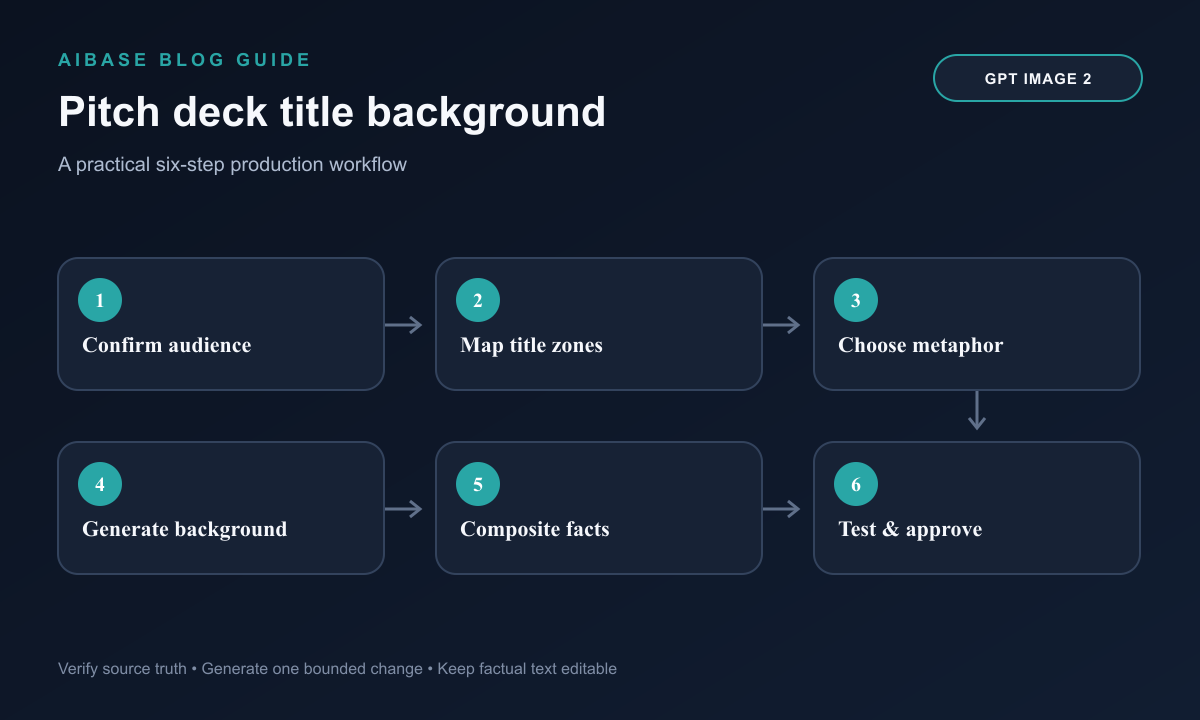
- Confirm the audience, meeting type, deck version, company positioning, approved brand assets, slide ratio, projection conditions, legal language, and owner for every factual claim.
- Map exact title, subtitle, logo, presenter, date, confidentiality, and optional round-information zones before writing the image prompt.
- Choose one non-factual visual principle such as clarity, coordination, focus, or infrastructure, then list symbols that would accidentally suggest traction, growth, coverage, partnership, or certification.
- Generate several text-free background families while changing only geometry, material, depth, or light; reject any output that resembles an unverified product screen, customer environment, or performance chart.
- Composite exact copy and brand assets in the presentation tool, then test at thumbnail size, projector contrast, video-call compression, PDF export, and grayscale print.
- Run founder, finance, legal, brand, accessibility, and meeting-owner review; archive prompt, source rights, selected background, layered deck, approvals, version, audience, and expiration.
Example prompt variants
- Text-free 16:9 enterprise software pitch title background, layered translucent planes suggesting coordination without arrows or upward motion, deep navy and cobalt, calm title area left, no interface, chart, metric, logo, word, or person.
- Text-free climate operations deck background, close material study of recycled paper fibers and one horizontal light transition, muted teal and cream, no leaf, globe, factory, emissions cue, certification, map, number, or claim.
- Text-free healthcare workflow deck background, precise modular forms with a protected center title zone and restrained depth, no patient, clinician, scan, molecule, device, result, privacy badge, text, or medical implication.
Quality checklist
- The visual supports positioning without functioning as evidence for product, traction, market, customer, partnership, financial, scientific, security, or sustainability claims.
- Title, subtitle, logo, presenter, date, confidentiality line, slide number, and alternate crop zones remain clear and readable.
- Every name, word, number, customer mark, product screen, chart, claim, source, and legal notice is an exact editable element outside generated pixels.
- Contrast, color, detail, crop, and file size work in projection, PDF, thumbnail, grayscale, and compressed video-call contexts.
- Prompt, visual source, brand review, claims review, deck version, intended audience, distribution, and retirement remain traceable.
Mistakes to avoid
- Asking for an impressive investor cover and accepting arrows, hockey-stick shapes, globes, customer-like logos, or product screens that imply unsupported traction.
- Letting the model render company name, round size, date, metric, confidentiality text, or customer marks inside pixels.
- Choosing dense cinematic detail that competes with the title or collapses under projection and video-call compression.
- Reusing an old title background after positioning, brand, legal language, audience, or fundraising status has changed.
Related AIBase pages
- Open GPT Image 2
- Create annual report cover backgrounds
- Create landing page hero backgrounds
- Create SaaS onboarding illustration backgrounds
Practical next step
Open the most relevant AIBase generator, run one narrow prompt first, and save the best result before adding more constraints. The fastest way to improve output quality is to compare one variable at a time: subject, camera, background, lighting, then final polish.