
GPT Image 2 Kickstarter Campaign Hero Image Prompts for Pre-Launch Concepts
Create Kickstarter-style pre-launch hero concepts with GPT Image 2 while keeping product status, features, rewards, claims, logos, and delivery information exact and editable.
Quick answer
Use GPT Image 2 to explore a text-free campaign setting and composition, not to fabricate a finished prototype or bake promises into pixels. Start from a verified product status sheet, reserve zones for an exact approved render or photograph, headline, funding disclosure, and CTA, then add those controlled elements in design software. Clearly label concept imagery when it could be mistaken for a shipping product.
Who this guide is for
Founders, crowdfunding teams, hardware startups, agencies, and designers preparing a pre-launch page, preview deck, waitlist creative, or campaign visual system before final photography exists.
Recommended model
| Use case | Recommended model | Why |
|---|---|---|
| This workflow | GPT Image 2 for text-free concept backgrounds, with approved product assets composited separately | The model can rapidly explore bounded art directions, while a layered workflow keeps the actual prototype, capabilities, specifications, reward details, dates, and campaign identity verifiable. |
AIBase is an independent creative platform. Model names are shown only to identify supported underlying technologies and workflow choices.
Prompt template
Create a text-free crowdfunding campaign hero background for [product category] aimed at [backer]. Campaign stage: [concept / working prototype / production sample], for mood and composition only. Reserve an exact-product zone at [position], a calm headline-safe zone at [position], and clear room for a disclosure and CTA. Scene: [verified use context], camera: [angle], light and palette: [direction], props: [maximum two]. Do not invent the product, logo, interface, accessory, feature, certification, award, review, price, discount, funding total, delivery date, performance result, user, text, or watermark. Return a background plate for compositing authorized assets.
Step-by-step workflow
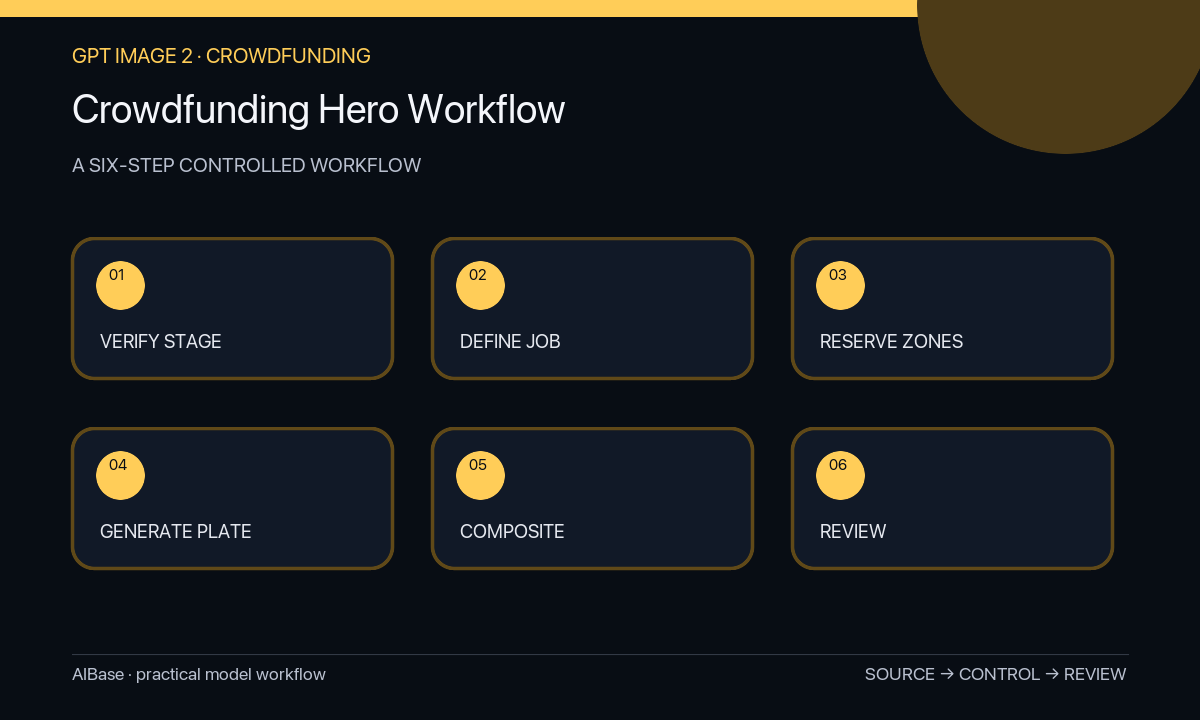
- Create a product truth sheet covering development stage, approved appearance, working features, limitations, specifications, tests, rights, rewards, price, delivery estimate, risks, and claim owners.
- Choose one page job for the hero: explain the category, show the use context, introduce the form, or create launch mood; move feature proof and comparisons to separate sections.
- Sketch safe zones for the exact product asset, headline, campaign-stage disclosure, CTA, mobile crop, and any platform-required information before generating.
- Generate several text-free backgrounds that vary only setting, camera, or lighting, then composite a current approved photograph or render without modifying its factual details.
- Review the composite for prototype mismatch, impossible use, unverified accessories, scale, reflections, hands, UI, claims, copy hierarchy, disclosure visibility, and mobile cropping.
- Archive the truth-sheet version, prompts, sources, composite layers, approvals, and campaign date; replace visuals when the product or delivery facts change.
Example prompt variants
- Text-free crowdfunding hero background for a compact desktop device, warm neutral studio with one oak surface, three-quarter product zone center-right and quiet headline space left, no device replica, screen, cable, logo, feature icon, award, price, or text.
- Text-free pre-launch hero plate for an outdoor accessory, early morning campsite detail without people, protected packshot zone lower center and dark copy-safe sky area above, no product, performance proof, weather claim, badge, review, or wording.
- Text-free campaign concept for a modular home object, bright apartment shelf with realistic scale cues and an empty exact-render zone, wide 16:9 crop plus centered mobile-safe composition, no invented module, app UI, person, logo, or claim.
Quality checklist
- The hero communicates one campaign idea and leaves controlled space for the exact product, headline, disclosure, and CTA.
- Product stage, appearance, functionality, accessories, specifications, price, reward, and delivery details come only from approved sources.
- Generated context does not imply certification, test results, mass production, customer adoption, or performance that has not been verified.
- The composition works at desktop and mobile crops without hiding the product or required disclosure.
- Source assets, prompts, layers, approvals, claim evidence, dates, and replacements remain traceable.
Mistakes to avoid
- Generating a polished fictional product and presenting it as the current prototype or production unit.
- Baking funding numbers, delivery dates, reviews, badges, discounts, specifications, or promises into the generated image.
- Showing untested environments, users, attachments, interfaces, or results that imply unsupported capability.
- Publishing a beautiful concept without a visible stage disclosure, mobile crop check, and update plan when facts change.
Related AIBase pages
- Open GPT Image 2
- Create Shopify hero backgrounds
- Build product infographic concepts
- Plan a full product launch campaign
Practical next step
Open the most relevant AIBase generator, run one narrow prompt first, and save the best result before adding more constraints. The fastest way to improve output quality is to compare one variable at a time: subject, camera, background, lighting, then final polish.