
Nano Banana 2 Prompts to Remove Lint from Apparel Product Photos
Remove lint, pet hair, and stray fibers from apparel product photos with Nano Banana 2 while preserving weave, seams, color, fit, labels, and natural fabric texture.
Quick answer
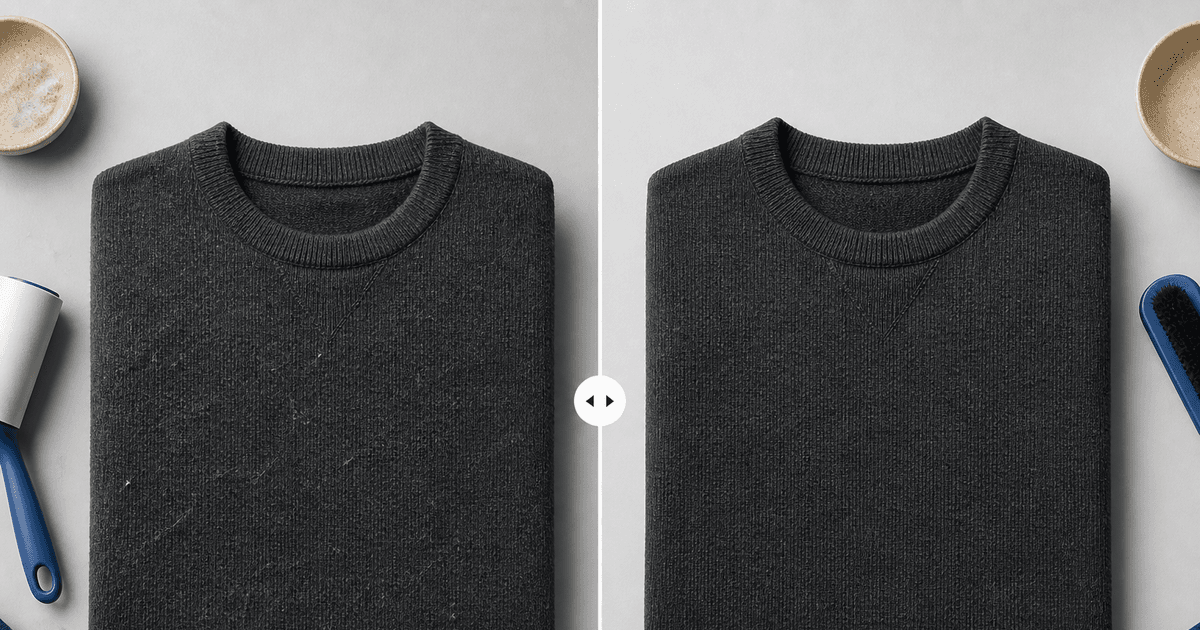
Use a high-resolution authorized garment photo and mark only foreign lint, pet hair, loose surface fibers, or debris that was not part of the product. Ask Nano Banana 2 to remove those marked contaminants while locking the fabric weave, nap, pilling that represents actual condition, seams, silhouette, color, labels, embroidery, folds, lighting, and every unmasked pixel. Review at 100% because an image can look cleaner while silently becoming plasticky or misrepresenting the garment’s condition.
Who this guide is for
Apparel sellers, resale teams, studio retouchers, catalog operators, and small brands cleaning approved flat-lay, mannequin, or on-model garment photos before marketplace publication.
Recommended model
| Use case | Recommended model | Why |
|---|---|---|
| This workflow | Nano Banana 2 image-to-image for a tightly masked cleanup pass | The source image already contains the verified garment, so a bounded reference-led edit is more appropriate than regenerating fabric, fit, construction, or branding from text. |
AIBase is an independent creative platform. Model names are shown only to identify supported underlying technologies and workflow choices.
Prompt template
Use the uploaded authorized apparel photo as the exact source. Remove only the marked [lint specks / pet hairs / loose foreign fibers / surface debris] from [precise garment region]. Preserve exact fabric weave, knit gauge, nap direction, legitimate pilling or wear, color, pattern repeat, stitching, seam placement, hem, ribbing, buttons, zipper, label, embroidery, print, silhouette, fit, folds, shadow, skin, hair, pose, background, crop, camera, lighting, and every unmasked pixel. Reconstruct the smallest missing textile area from immediately adjacent source texture. No smoothing, denoising, dewrinkling, recoloring, reshaping, repair, beautification, new fibers, text, logo change, or watermark.
Step-by-step workflow
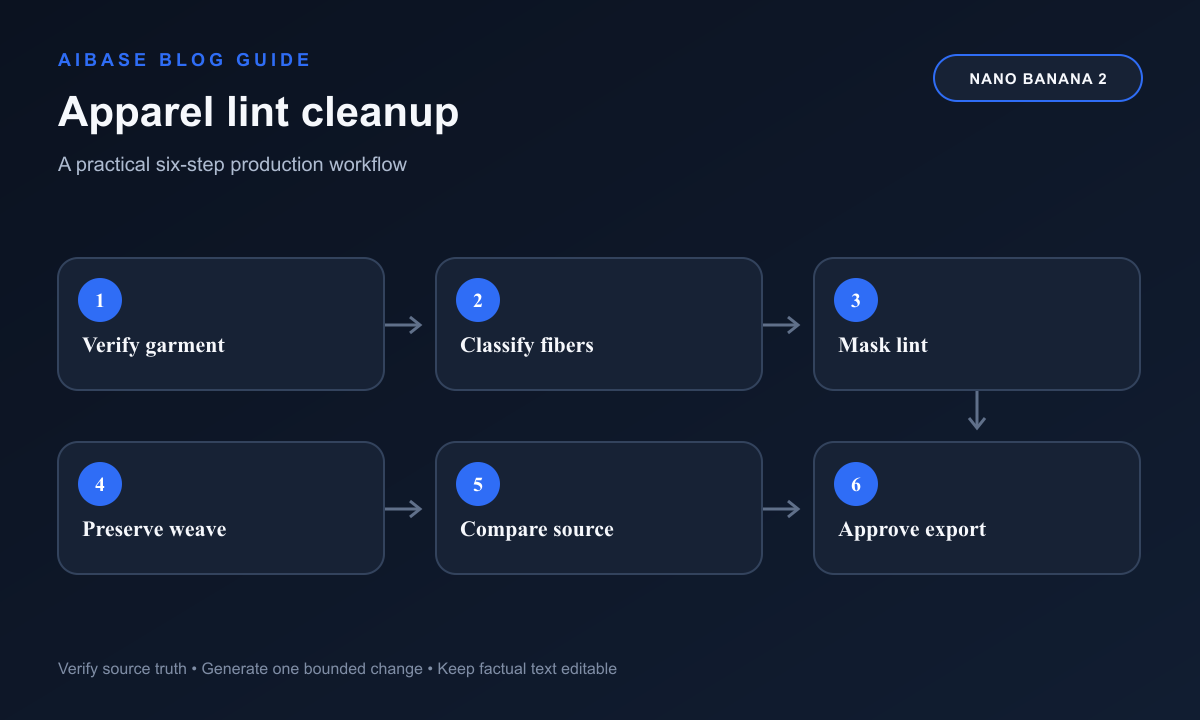
- Confirm the exact SKU, colorway, material, condition standard, source rights, and whether visible pilling, slubs, raw edges, distressing, or wear are truthful product characteristics that must remain.
- Inspect at 100% and classify each mark as removable contamination, intentional texture, construction detail, damage, or uncertain; send uncertain marks to the product owner instead of guessing.
- Create small masks around confirmed lint or hair with enough neighboring weave for reconstruction, avoiding seams, print edges, embroidery, labels, skin, and garment boundaries.
- Run separate conservative passes by region and contaminant type; keep color correction, wrinkle reduction, background cleanup, and shape repair outside this request.
- Compare source and output at pixel scale for repeated texture, smeared knit, missing nap, softened stitching, haloed edges, color shifts, altered wear, and accidental cleanup outside the mask.
- Approve against the physical item or current product record, then retain the source, condition notes, mask, prompt, output, reviewer, export, and marketplace version.
Example prompt variants
- Remove only the six marked white lint specks from the front chest of the approved charcoal merino sweater; preserve knit direction, natural fuzz, ribbed collar, seam, fold, color, lighting, and every unmasked pixel.
- Remove only the marked pet hairs crossing the navy cotton jacket sleeve, reconstruct from adjacent twill at matching direction and scale, preserve cuff stitching, legitimate wear, buttons, shadow, and exact product color.
- Clean the marked loose packing fibers from the flat-lay linen shirt background and lower hem only; preserve linen slubs, wrinkles, raw texture, hem construction, label, crop, and no global smoothing.
Quality checklist
- Only confirmed foreign lint, hair, or debris is removed; intentional fibers, slubs, pilling, distressing, wear, damage, and condition evidence remain accurate.
- Weave, knit gauge, nap, pattern repeat, seams, hems, labels, embroidery, prints, hardware, silhouette, fit, folds, and product color match the source.
- Patched areas have no blur, cloning repetition, texture seam, halo, over-sharpening, color shift, or artificial plastic finish at 100% zoom.
- People, skin, hair, mannequin, hanger, background, shadow, camera, crop, and all unmasked pixels remain unchanged.
- Source rights, physical condition, masks, prompts, outputs, review, disclosure needs, and publication version remain traceable.
Mistakes to avoid
- Using make the garment perfectly clean and erasing truthful pilling, distressed fibers, raw hems, or resale condition evidence.
- Applying a whole-image beauty pass that smooths knit texture, softens stitching, changes color, or reshapes the garment.
- Masking across seams, logos, embroidery, print edges, skin, or silhouette and letting the model reconstruct protected details.
- Publishing without comparison to the source and current item, especially when the edit could overstate newness or condition.
Related AIBase pages
- Open Nano Banana 2 image editing
- Dewrinkle apparel product photos
- Remove dust and fingerprints
- Create apparel ghost-mannequin images
Practical next step
Open the most relevant AIBase generator, run one narrow prompt first, and save the best result before adding more constraints. The fastest way to improve output quality is to compare one variable at a time: subject, camera, background, lighting, then final polish.