
Seedream 5.0 Lite Case Study Cover Background Prompts with Proof-Safe Layouts
Draft text-free case study cover backgrounds with Seedream 5.0 Lite while keeping client identity, metrics, quotes, screenshots, and proof in approved editable layers.
Quick answer
Use generation for a text-free visual metaphor and layout framework only. Reserve clear zones for the approved client logo, case-study title, verified result, real screenshot or product image, attribution, and disclosure. Never generate a client, dashboard, metric, quote, award, or industry setting that could be mistaken for evidence.
Who this guide is for
B2B marketers, SaaS teams, agencies, consultants, and content designers producing gated PDFs, website customer stories, sales enablement covers, and LinkedIn case-study announcements.
Recommended model
| Use case | Recommended model | Why |
|---|---|---|
| This workflow | Seedream 5.0 Lite for rapid text-free cover directions | Fast visual exploration works well for abstract story metaphors and copy-safe layout systems when all customer proof stays in authorized source assets. |
AIBase is an independent creative platform. Model names are shown only to identify supported underlying technologies and workflow choices.
Prompt template
Create a text-free case study cover background for [industry or generalized problem] with the visual idea [abstract transformation metaphor]. Format family: [web hero / PDF cover / social card], with a shared mobile-safe focal center. Reserve an exact client-logo zone at [position], title zone at [position], verified-result zone at [position], and an empty frame for an approved screenshot or photograph at [position]. Palette and style: [specific], visual density: [low/medium]. Do not generate a company logo, client identity, person, workplace, product UI, chart, number, percentage, quote, award, certification, result, text, or watermark.
Step-by-step workflow
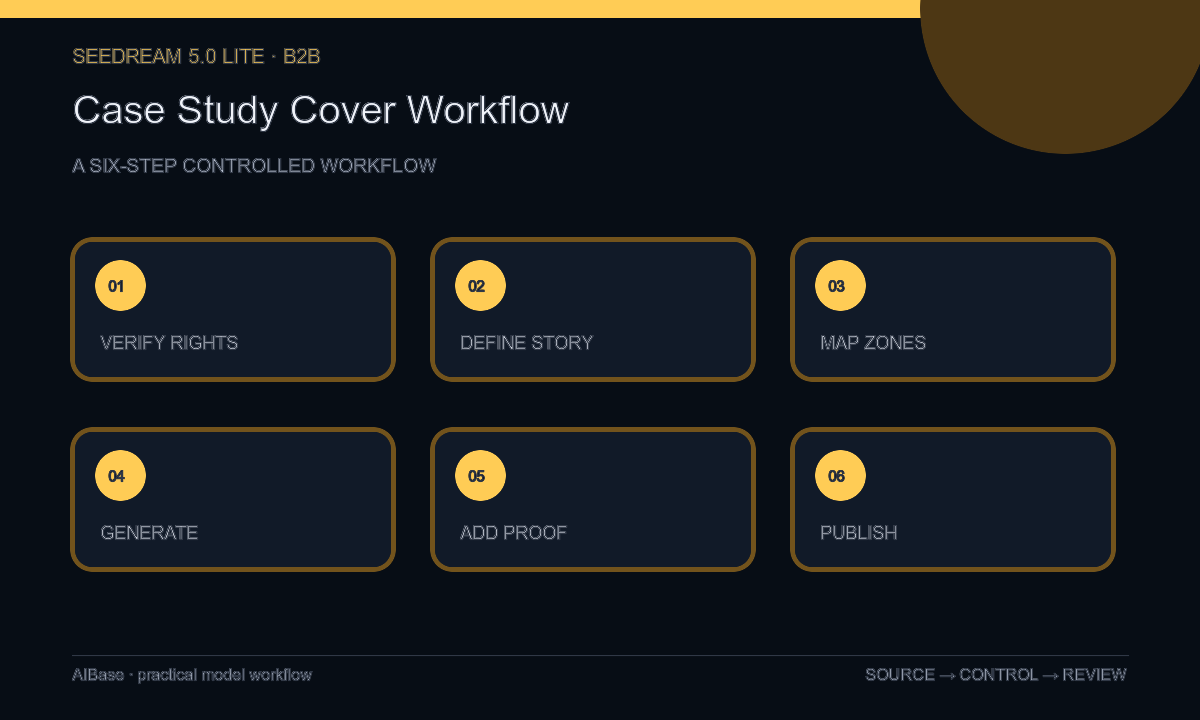
- Confirm written permission, naming rules, logo usage, approved story, metric definitions, measurement window, source evidence, quote attribution, screenshot rights, embargo, and expiration.
- Reduce the story to one truthful before-to-after idea without translating a business result into an exaggerated literal scene.
- Map the title, client identity, verified metric, proof asset, disclosure, and crop-safe zones across web, PDF, email, and social derivatives.
- Generate several text-free abstract backgrounds, changing only metaphor, palette, or composition while keeping the same proof-safe zones.
- Add the approved logo, exact title, sourced metric, attributed quote, and real screenshot or photograph in editable layers, then test thumbnail and mobile readability.
- Run client, legal, data, brand, accessibility, and destination review; archive evidence and replace or remove the cover when permission or metrics change.
Example prompt variants
- Text-free B2B case study cover background, modular dark-blue blocks moving from scattered left to aligned right, quiet title zone upper left and empty approved-screenshot frame lower right, no dashboard, logo, number, arrow label, or text.
- Text-free customer story background for an operations workflow, warm neutral paper layers connected by one cobalt path, reserved logo top, headline center-left, verified-result card bottom, no office, worker, company identity, chart, or wording.
- Text-free square case study announcement, abstract translucent layers converging into one clear central panel, forest green and cream palette, safe zones for client mark and metric, no interface, testimonial portrait, percentage, badge, or letters.
Quality checklist
- Client permission, naming, logo usage, evidence, metric definition, date range, quote, screenshot rights, and publication scope are current.
- The generated background is clearly illustrative and contains no fictional client, workplace, interface, metric, chart, quote, award, or result.
- Title, client identity, proof asset, verified result, attribution, and disclosure fit every intended crop and remain editable.
- The visual metaphor supports the real story without overstating causation, scale, speed, certainty, or industry context.
- Permission, evidence, prompts, layers, reviewers, exports, destinations, publication date, and retirement trigger remain traceable.
Mistakes to avoid
- Generating a convincing dashboard, chart, customer office, or portrait and letting readers interpret it as case-study evidence.
- Featuring a large percentage without its approved definition, baseline, measurement window, attribution, and qualification.
- Building one busy cover that fails as a PDF thumbnail, website hero, and mobile social crop.
- Treating customer permission and performance data as permanent instead of maintaining an expiration and removal process.
Related AIBase pages
- Open Seedream 5.0 Lite
- Create lead magnet covers
- Create blog featured backgrounds
- Create LinkedIn post backgrounds
Practical next step
Open the most relevant AIBase generator, run one narrow prompt first, and save the best result before adding more constraints. The fastest way to improve output quality is to compare one variable at a time: subject, camera, background, lighting, then final polish.