
Seedream 5.0 Lite Quote Card Background Prompts
Generate text-free quote-card backgrounds with Seedream 5.0 Lite using a calm copy zone, source-aware visual cues, platform crops, editable typography, and accessibility checks.
Quick answer
Verify the quote and permission first, then generate only the background. Reserve a low-detail area sized for the real quote, add the words, attribution, logo, and disclosure as editable typography, and check contrast at mobile size. The background should reinforce the speaker or topic without pretending to depict a real event.
Who this guide is for
Social teams, founders, educators, event marketers, podcasters, nonprofits, and editorial designers turning approved quotes, testimonials, research excerpts, or internal insights into shareable cards.
Recommended model
| Use case | Recommended model | Why |
|---|---|---|
| This workflow | Seedream 5.0 Lite text-to-image for rapid background directions | A fast draft model is useful for testing several text-free compositions before the verified quote and attribution are typeset in the design system. |
AIBase is an independent creative platform. Model names are shown only to identify supported underlying technologies and workflow choices.
Prompt template
Create a text-free [square/portrait/landscape] quote-card background for an approved quote about [topic] aimed at [audience]. Visual cue: [one source-safe object, texture, or abstract metaphor]. Reserve a calm, low-detail text zone in [region] sized for [short/medium/long] copy, with consistent contrast and safe margins. Palette [approved colors], lighting [direction], tone [specific mood], essential detail inside the shared crop-safe area. No text, letters, quotation marks, logo, face, speaker likeness, signature, book cover, event stage, testimonial badge, rating, claim, fake document, watermark, or decorative element behind the copy zone.
Step-by-step workflow
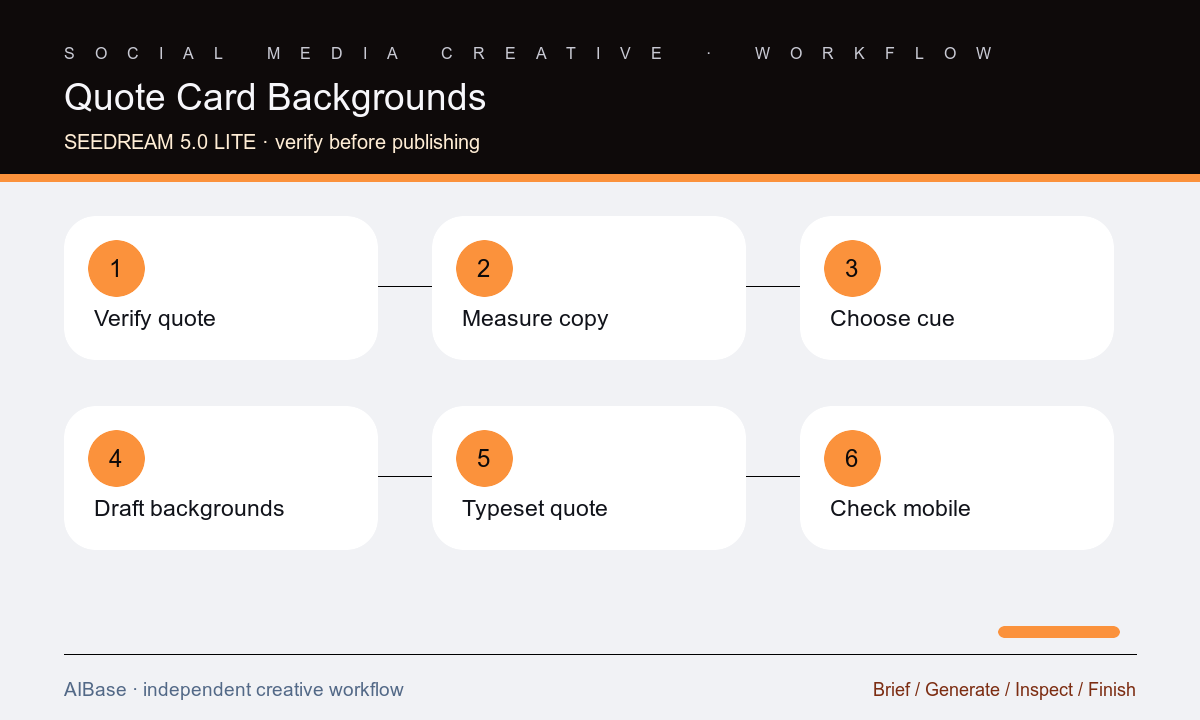
- Verify the exact quote, spelling, punctuation, attribution, source link, context, edit permission, testimonial consent, and any disclosure required for publication.
- Measure the real copy in the approved type system, then define text-zone width, line count, safe margins, attribution area, logo area, and target platform crops.
- Choose one visual cue that supports the topic without fabricating the speaker, workplace, event, customer outcome, document, or product use.
- Generate three text-free backgrounds with the same copy zone and palette, changing only the visual cue or material treatment.
- Typeset the verified quote and attribution as editable layers, then check contrast, line breaks, hierarchy, source visibility, and logo clearance at phone size.
- Export platform-specific crops with alt text and source records, and compare the published card with the approved quote before scheduling.
Example prompt variants
- Square text-free quote-card background about focused work, one folded-paper path in the lower right, quiet deep-blue text zone left, soft daylight, warm coral accent, no person, desk brand, words, marks, or interface.
- Portrait testimonial-card background for a home-organization service, subtle shelf-grid shadow and linen texture at the bottom, calm cream text zone upper center, no home photo, client likeness, rating stars, quote marks, or claim.
- Landscape research-insight card background, restrained data-wave motif along the far right, charcoal text zone left, cyan accent, editorial tone, no chart values, report cover, institution logo, letters, or fabricated evidence.
Quality checklist
- The quote, attribution, source, context, edits, consent, and disclosure match the approved record exactly.
- The background contains no generated words, quotation marks, faces, logos, signatures, ratings, documents, or implied evidence.
- The text zone supports the real copy with stable contrast, readable line lengths, safe margins, clear attribution, and accessible phone-size type.
- Essential visual cues and text remain inside every platform crop without colliding with avatars, controls, captions, or logo placement.
- Editable source files, prompt, generated background, quote approval, alt text, exports, and removal contact remain traceable.
Mistakes to avoid
- Asking the model to render the full quote, attribution, logo, and punctuation inside the image and publishing misspelled or uneditable text.
- Using an AI-generated likeness, event stage, customer home, product scene, or document that falsely appears to prove where the quote came from.
- Choosing a detailed background before measuring the quote, then shrinking the type or placing words over unstable contrast.
- Trimming a quote for fit without marking the edit, checking context, preserving meaning, or obtaining the required approval.
Related AIBase pages
- Open Seedream 5.0 Lite
- Use social media prompt templates
- Create LinkedIn post backgrounds
- Create blog featured-image backgrounds
Practical next step
Open the most relevant AIBase generator, run one narrow prompt first, and save the best result before adding more constraints. The fastest way to improve output quality is to compare one variable at a time: subject, camera, background, lighting, then final polish.