
Veo 3.1 Fast Mobile App Feature Reel Prompts
Plan fast vertical feature reels with generic motion inserts while keeping shipped UI, gestures, availability, privacy, and product claims grounded in real captures.
Quick answer
Use real screen recordings for every shipped interface, tap, swipe, setting, permission, output, plan gate, and platform difference. Use Veo 3.1 Fast only for short generic hooks or transitions—moving light, abstract panels, or a neutral device-free spatial metaphor. Assemble a 6–12 second reel with one feature promise, one real proof beat, one limitation or availability note, and one verified CTA.
Who this guide is for
Mobile product marketers, SaaS teams, indie app developers, launch agencies, and social editors announcing a specific shipped app feature.
Recommended model
| Use case | Recommended model | Why |
|---|---|---|
| This workflow | Veo 3.1 Fast for generic short-form hooks around real app capture | Fast clip generation is useful for testing opening rhythm and transitions, while authentic UI capture protects product behavior and customer expectations. |
AIBase is an independent creative platform. Model names are shown only to identify supported underlying technologies and workflow choices.
Prompt template
Create one [3-4]-second text-free vertical 9:16 insert for a mobile-app feature reel. Concept: [abstract cards aligning / light tracing a simple path / neutral layers expanding into clear space]. Camera: [locked / gentle push], one motion, stable endpoint, quiet [top/bottom] caption zone. No phone, tablet, operating-system chrome, app UI, dashboard, notification, cursor, tap, person, face, hand, feature result, metric, review, plan badge, privacy claim, logo, word, number, synthetic voice, or watermark.
Step-by-step workflow
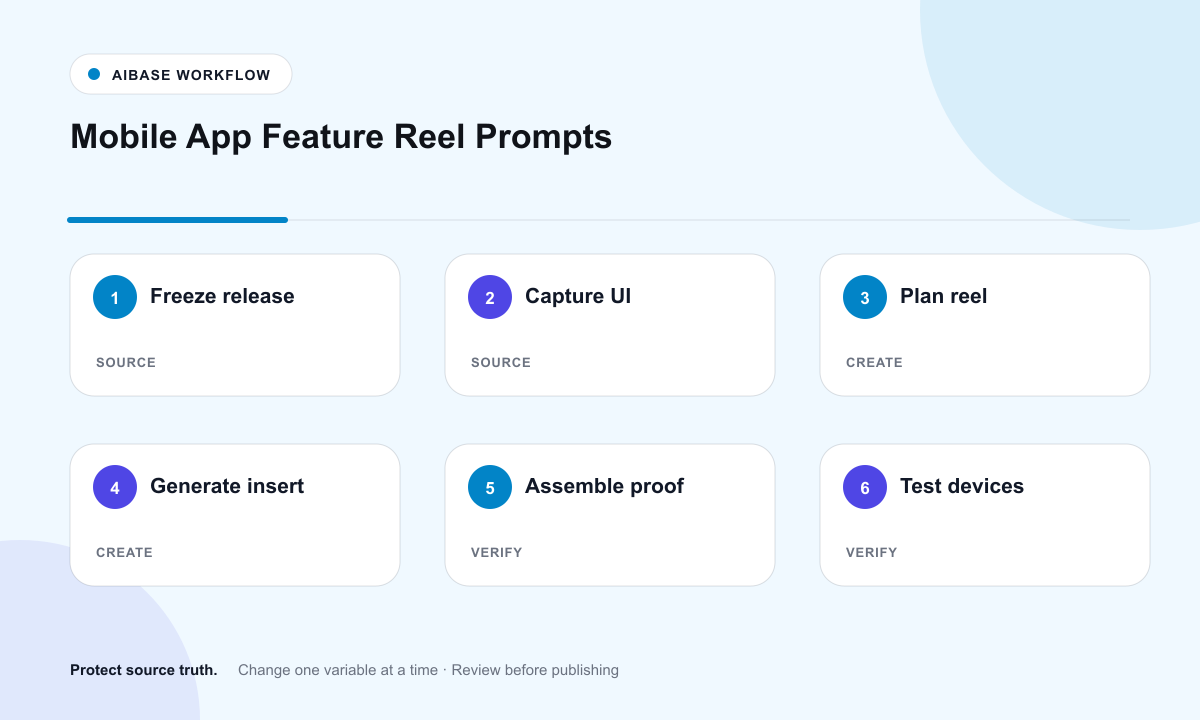
- Freeze the shipped feature, supported versions, platforms, accounts, rollout, plan access, permissions, limitations, data handling, support article, and CTA destination.
- Capture real device or simulator footage of the exact build, account state, gesture path, loading, empty, success, error, and permission behavior required for the story.
- Storyboard a concise hook, real setup, one real interaction, real result, limitation or availability note, and CTA with one job per shot.
- Generate only generic device-free hooks or transitions with one motion and protected caption space; never synthesize the product interface.
- Composite real recordings, approved copy, captions, disclosure, localized UI callouts, licensed sound, deep link, store link, and analytics.
- Test current iOS and Android builds, light and dark mode, reduced motion, mobile crop, muted autoplay, permissions, rollout eligibility, links, captions, and correction path.
Example prompt variants
- Three-second vertical opener of translucent cobalt planes snapping into one calm column, subtle push, clear lower caption zone, no device, UI, icon, metric, or text.
- Four-second transition of a single luminous path connecting two neutral rounded surfaces and settling, dark background, no app screen, notification, cursor, or logo.
- Three-second closing insert with soft mint layers opening around a clean central CTA zone, one gentle motion, no button, store badge, rating, download count, or word.
Quality checklist
- Feature behavior, app build, platforms, devices, plan access, rollout, permissions, limitations, data handling, and links are current.
- Every interface, gesture, loading state, result, error, and setting shown comes from approved real product capture.
- Generated footage contains no fake device, UI, metric, review, feature outcome, platform badge, privacy or performance claim.
- Captions, localization, disclosure, audio rights, contrast, reduced motion, mobile crop, CTA, deep links, and analytics are tested.
- Truth sheet, captures, prompt, outputs, edit version, approvals, rollout date, correction, and retirement remain traceable.
Mistakes to avoid
- Generating a polished fake app interface because it looks clearer than the shipped product.
- Showing a feature to users, platforms, regions, or plans where it is not available.
- Packing setup, interaction, result, social proof, and CTA into one synthetic shot.
- Publishing without testing the current build, permission flow, dark mode, captions, deep link, rollout, and correction path.
Related AIBase pages
Practical next step
Open the most relevant AIBase generator, run one narrow prompt first, and save the best result before adding more constraints. The fastest way to improve output quality is to compare one variable at a time: subject, camera, background, lighting, then final polish.