
Veo 3.1 Fast Webinar Reminder Reel Prompts That Stay Honest
Create short generic reminder hooks with protected date, speaker, topic, and registration zones while avoiding fake audiences or unverified claims.
Quick answer
Use Veo 3.1 Fast for a five-to-seven-second generic attention plate: one subject motion, one camera move, and large protected areas for date, topic, speaker, and registration. Add the real speaker portrait, title, time zone, accessibility details, and registration link in editing. Do not generate an audience, dashboard result, expert endorsement, or platform logo that the event does not verify.
Who this guide is for
Marketing teams, webinar hosts, course creators, and B2B growth teams needing quick reminder variants for feed, story, LinkedIn, and email embeds.
Recommended model
| Use case | Recommended model | Why |
|---|---|---|
| This workflow | Veo 3.1 Fast for rapid generic reminder-hook variants | Fast iteration helps test visual hooks while authoritative event facts and speaker assets remain separate editable layers. |
AIBase is an independent creative platform. Model names are shown only to identify supported underlying technologies and workflow choices.
Prompt template
Create a [5-7 second] [aspect ratio] generic webinar reminder visual plate. Subject: [safe concrete object or environment]. One motion event: [specific]. Camera: [one simple move]. Lighting and palette: [specific]. Leave the [center / upper third / right side] clean for editable date, topic, speaker, and registration zones; keep outer edges crop-safe. No people, audience, fake analytics, screen content, platform logo, brand, endorsement, readable text, number, countdown, sound, or watermark.
Step-by-step workflow
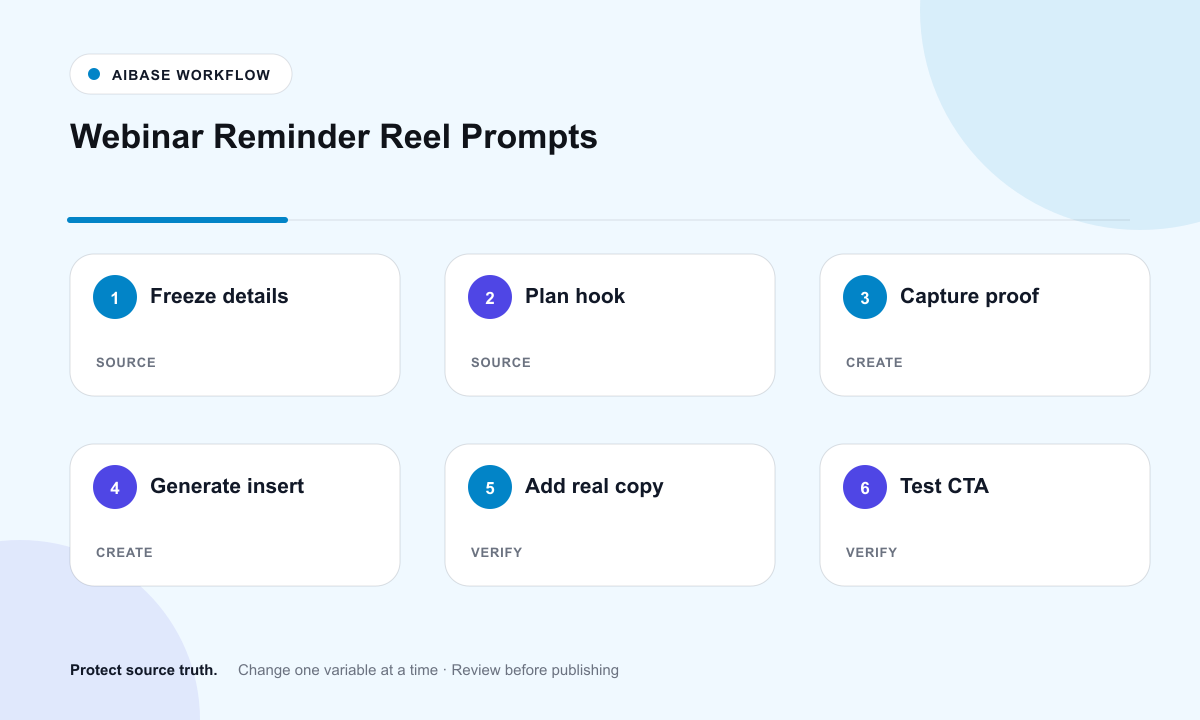
- Freeze event truth: title, speaker, date, time zone, duration, agenda, host, accessibility, registration limit, replay policy, and approved claims.
- Choose one hook idea that does not depend on a fake audience, expert persona, product result, or recognizable platform interface.
- Generate a short generic plate with one motion and clearly reserved copy zones.
- Composite the approved speaker portrait, exact date and time zone, agenda, accessibility note, disclosure, captions, and registration link.
- Create feed, story, LinkedIn, and email embed crops; verify tap targets and autoplay behavior.
- Run a pre-launch click test, update registration capacity or replay policy, and retire the asset after the event.
Example prompt variants
- Five-second desk hook: a notebook opens and a pen rolls gently into frame; upper two-thirds remains empty for event copy; no people or text.
- Six-second abstract hook: soft blue panels assemble toward a calm central rectangle reserved for speaker and date; no interface or logo.
- Five-second studio hook: a chair slides slightly into a clean setup, right side stays quiet for registration CTA; no audience or claim.
Quality checklist
- Date, time zone, speaker, agenda, accessibility, replay, and registration facts are current and editable.
- The generated plate contains no audience, expert impersonation, fake analytics, platform logo, endorsement, or readable claim.
- Copy zones survive every crop and remain readable on mobile in muted autoplay.
- Captions, speaker consent, registration tap target, tracking, and privacy disclosure are tested.
- Post-event removal or replay-state update is planned and traceable.
Mistakes to avoid
- Generating a crowded webinar room or applause to imply demand that is not real.
- Baking the date, speaker name, or registration URL into pixels where they cannot be corrected.
- Using a recognizable platform interface or logo without permission.
- Forgetting time zones, accessibility details, replay policy, or registration capacity changes.
Related AIBase pages
Practical next step
Open the most relevant AIBase generator, run one narrow prompt first, and save the best result before adding more constraints. The fastest way to improve output quality is to compare one variable at a time: subject, camera, background, lighting, then final polish.