
Veo 3.1 Fast Hotel Room Social Reel Prompts That Keep Amenities Truthful
Create fast hotel-room Reel concepts with Veo 3.1 Fast while separating illustrative transitions from real room types, views, amenities, accessibility, rates, and availability.
Quick answer
Use current real footage for the specific room, view, bathroom, accessibility features, amenities, staff, and property. Use Veo 3.1 Fast only for clearly illustrative openers, neutral material transitions, or mood plates that do not impersonate the hotel. Build each Reel from short shot jobs, add exact room name, rate terms, booking link, captions, and disclosures in post, and verify the mobile crop before release.
Who this guide is for
Hotels, inns, vacation properties, hospitality agencies, social editors, and revenue teams creating quick room-type introductions, seasonal social posts, paid Reels, or booking-page cutdowns.
Recommended model
| Use case | Recommended model | Why |
|---|---|---|
| This workflow | Veo 3.1 Fast for generic hospitality transition plates, combined with current real room footage | Fast iteration helps test hooks and non-evidentiary mood shots, while real capture remains necessary wherever viewers expect to see the actual property and bookable room. |
AIBase is an independent creative platform. Model names are shown only to identify supported underlying technologies and workflow choices.
Prompt template
Create one [3-6 second] 9:16 illustrative hospitality transition plate for a hotel Reel. Shot job: [opening mood / material transition / end-card atmosphere]. Generic subject: [sunlight moving across neutral linen / key card beside an unbranded door texture / abstract water reflection]. Motion: [one action]. Camera: [locked / one simple move]. Palette and light: [specific]. Keep the center readable, top interface area quiet, and lower caption zone clear. This is not a real property, room, amenity, view, or guest. No hotel replica, room layout, bed count, bathroom, balcony, window view, pool, accessibility feature, staff, guest, logo, rating, rate, availability, offer, location, readable text, or watermark.
Step-by-step workflow
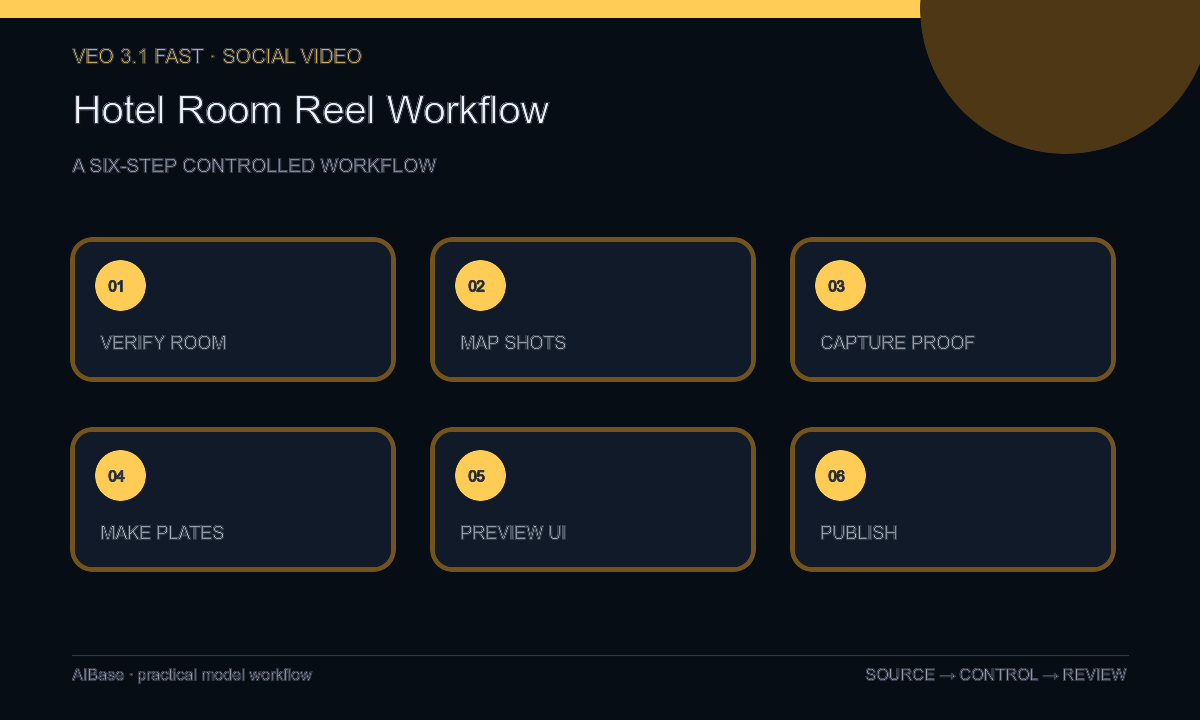
- Verify the current room type, bed configuration, size, view language, bathroom, accessibility details, amenities, occupancy, image rights, rates, terms, availability, property rules, and booking destination.
- Map a six-to-fifteen-second Reel into hook, real room proof, one or two feature details, atmosphere, and booking resolve, labeling every shot as real or illustrative.
- Capture the exact room, bathroom, view, amenity, access route, and staff interactions viewers need to evaluate; do not use generated scenes for booking evidence.
- Generate only generic transition or mood plates with no property-specific architecture, room, amenity, guest, view, logo, rating, price, or claim.
- Assemble real and illustrative shots with clear sequencing, exact room label, captions, audio rights, rate qualifiers, CTA, disclosure, and a working deep link.
- Preview with platform UI, inspect factual continuity and crop safety, then run property, accessibility, revenue, brand, legal, and destination review before publishing.
Example prompt variants
- Four-second vertical opener, soft morning light travels once across neutral unbranded linen in macro detail, locked camera, quiet upper third and caption-safe lower band, no bed, room, logo, view, guest, amenity, or text.
- Three-second generic transition, an unbranded brass key card sleeve slides minimally onto a dark stone surface and stops, top-down crop, no hotel mark, room number, hand, claim, interface, or wording.
- Five-second end-card atmosphere, abstract pool-blue reflections move slowly across a plain cream wall, camera fixed, central CTA-safe zone, explicitly illustrative, no pool, property, palm, destination, person, logo, or text.
Quality checklist
- Room type, bed, dimensions, view, bathroom, amenities, accessibility, occupancy, rules, rate terms, availability, and booking link match current property data.
- Every property-specific or bookable feature uses current authorized real capture and is labeled separately from illustrative generation.
- Generated plates contain no fictional room, architecture, view, pool, amenity, staff member, guest, rating, price, offer, or destination cue.
- The edit is legible behind platform UI, captions are accurate, audio is licensed, disclosure is visible, and the CTA reaches the correct room page.
- Truth source, shot classification, prompts, real footage, approvals, export, publication window, and retirement action remain traceable.
Mistakes to avoid
- Generating an aspirational room or view and cutting it beside real footage so viewers assume it is bookable.
- Using an accessibility feature, pool, balcony, breakfast, workspace, or bathroom layout that is not present in the specific room type.
- Baking a rate or availability claim into the video without dates, qualifiers, inventory checks, and a current destination.
- Designing the composition without the Reel interface and losing room labels, captions, disclosure, or CTA behind overlays.
Related AIBase pages
- Open Veo 3.1 Fast
- Create hotel brand films
- Create real estate open-house Reels
- Compare short social ad models
Practical next step
Open the most relevant AIBase generator, run one narrow prompt first, and save the best result before adding more constraints. The fastest way to improve output quality is to compare one variable at a time: subject, camera, background, lighting, then final polish.