
Veo 3.1 Fast Local Business Reel Prompts for Weekly Social Content
Draft local-business Reel concepts with Veo 3.1 Fast prompts for one weekly message, believable service scenes, vertical framing, caption space, and honest promotion.
Quick answer
Build each Reel around one real weekly message and three short shot jobs: hook, process or atmosphere, and resolve. Use generated scenes for generic concepts or transitions, but use current footage for the actual storefront, staff, products, service results, prices, availability, and customer proof.
Who this guide is for
Cafes, salons, studios, shops, clinics, restaurants, service businesses, local marketers, and agencies planning repeatable vertical content without turning every post into a large production.
Recommended model
| Use case | Recommended model | Why |
|---|---|---|
| This workflow | Veo 3.1 Fast | A fast video-generation workflow is useful for exploring short hooks, generic atmosphere, transition shots, and storyboard alternatives before real business footage and verified details are edited in. |
AIBase is an independent creative platform. Model names are shown only to identify supported underlying technologies and workflow choices.
Prompt template
Create a [duration] 9:16 social-video concept for a [business category] about [one truthful weekly message]. SHOT JOB: [hook/process/atmosphere/resolve]. SUBJECT: [one generic scene or object action]. ACTION: [one visible action]. CAMERA: [locked or one simple move]. LIGHT/MOOD: [specific]. COMPOSITION: keep the center action clear, leave lower caption area and top interface area uncluttered, and finish on a stable edit frame. This is a generic concept, not a depiction of a real business or customer. No business name, storefront replica, staff identity, customer testimonial, price, offer, result, review, certification, health claim, readable text, logo, unsafe practice, extra action, or watermark.
Step-by-step workflow
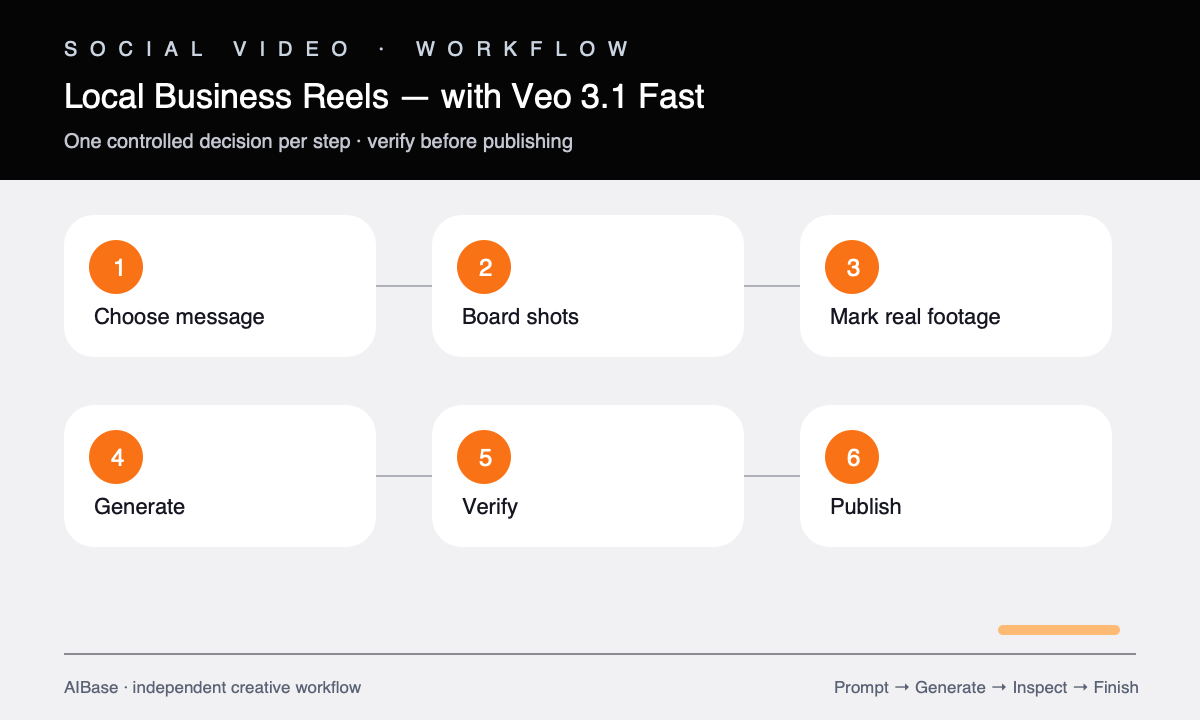
- Choose one verified weekly message, audience, action, CTA, location, availability window, and any claim or consent constraints.
- Write a three-shot board in which every clip has one job and can stand alone: attention, credible context, or clean resolve.
- Mark which shots require real footage, especially storefront, staff, signature product, regulated service, result, testimonial, inventory, and offer.
- Generate only the generic concept or transition shots with one action, one camera move, vertical safe zones, and a clean ending.
- Review people, tools, service steps, food handling, anatomy, signage, setting, camera, continuity, and whether the scene could mislead a local viewer.
- Edit with current authorized footage, real captions, business name, location, price, availability, CTA, licensed audio, disclosures, and descriptive text.
Example prompt variants
- Five-second vertical cafe hook, close-up of steam curling from a generic ceramic cup as morning light moves across a wooden counter, slow push-in, clean lower caption space, no shop identity or latte-art logo.
- Six-second salon atmosphere concept, neatly arranged generic brushes and folded towels as one hand places a comb beside them, locked overhead camera, warm clean light, no client, treatment, result, or brand.
- Five-second pottery-studio transition, one unbranded clay bowl turns slowly on a wheel while hands remain outside frame, soft side light, stable camera, clear upper title space, no maker identity or finished-product claim.
Quality checklist
- The Reel communicates one weekly message and each shot contains one understandable action.
- Generated scenes are clearly generic and do not impersonate the real storefront, staff, customer, product, service result, or testimonial.
- People, tools, procedures, food handling, anatomy, setting, physics, camera, and continuity are plausible and safe.
- The 9:16 composition protects subject, captions, CTA, and interface zones and ends on a useful edit frame.
- Final location, hours, offer, inventory, price, credentials, claims, audio, releases, and CTA are current and verified.
Mistakes to avoid
- Generating a fictional storefront or staff member and presenting it as the real local business.
- Combining several weekly offers, services, and audiences in one short Reel.
- Letting a generic service scene imply a regulated outcome, testimonial, hygiene standard, or professional credential.
- Publishing without checking current hours, price, availability, location, music rights, and participant consent.
Related AIBase pages
- Open Veo 3.1 Fast
- Build a short social ad storyboard
- Create event promo videos
- Plan vertical social prompts
Practical next step
Open the most relevant AIBase generator, run one narrow prompt first, and save the best result before adding more constraints. The fastest way to improve output quality is to compare one variable at a time: subject, camera, background, lighting, then final polish.