
Veo 3.1 Fast Self-Storage Social Reel Prompts
Plan fast self-storage social reels with Veo 3.1 Fast while keeping facility evidence, unit availability, security, pricing, and access rules truthful.
Quick answer
Use real photos or footage for the actual facility, gates, corridors, unit sizes, access route, and staff. Veo 3.1 Fast can add generic b-roll, simple object motion, or transitions—rolling doors, clean hallway light, lock close-up, or moving boxes—but it should not invent a location, security feature, availability, price, climate-control state, or legal term. Keep operational facts and CTAs in editable captions.
Who this guide is for
Self-storage operators, local marketing agencies, property managers, and franchise social teams making short reels for unit size education, move-in season, or facility announcements.
Recommended model
| Use case | Recommended model | Why |
|---|---|---|
| This workflow | Veo 3.1 Fast | Fast short-form generation works well for low-risk generic motion and hooks, while authoritative facility imagery and operational facts should stay real. |
AIBase is an independent creative platform. Model names are shown only to identify supported underlying technologies and workflow choices.
Prompt template
Create a [5-8 second] text-free vertical self-storage social clip. Subject: [generic rolling door / empty corridor light / lock close-up / organized boxes]. Motion: [one simple move]. Camera: [locked / slow push]. Reserve [top or bottom] for caption and CTA. Mood: [clean and calm]. No facility signage, address, invented security feature, camera system, access badge, climate control, unit size, price, availability, contract, person, word, number, logo, or watermark.
Step-by-step workflow
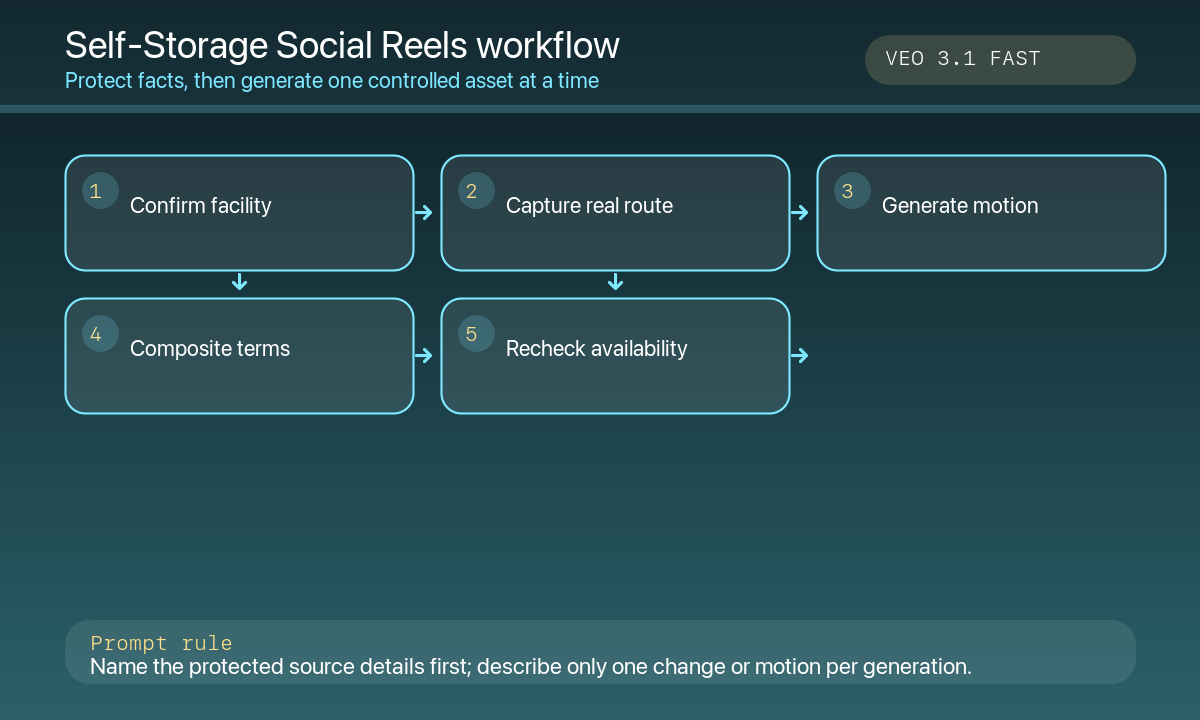
- Freeze facility facts: address, hours, access rules, unit sizes, insurance requirements, climate-control zones, security features, current price, promotions, and lease terms.
- Capture authorized real footage of the gate, office, corridor, exact unit sizes, loading area, and accessibility route.
- Use Veo 3.1 Fast only for generic object motion, atmosphere, or a transition that does not imply a specific location.
- Build a reel around one clear job: choose size, prepare belongings, understand access, or reserve online.
- Composite real footage, captions, price, terms, map link, phone number, and CTA in the editor.
- Recheck availability, pricing, hours, access rules, accessibility, and tracking before publishing or boosting.
Example prompt variants
- Five-second vertical hook: a generic clean gray rolling door rises smoothly in neutral daylight, locked camera, top and bottom caption zones; no signage, unit size, price, facility, or text.
- Six-second size-education transition: three generic cardboard stacks remain static while soft corridor light shifts, quiet center copy zone; no invented room dimensions, climate claim, or person.
- Seven-second access-prep close-up: a neutral padlock clicks once on a clean hasp, shallow focus, bottom CTA zone; no brand, security guarantee, hours, address, or words.
Quality checklist
- Real facility footage, address, hours, access rules, unit sizes, and amenities are current.
- Generated pixels contain no fake location, security system, climate state, availability, discount, or contract term.
- The reel answers one viewer task and captions remain readable with sound off.
- Pricing, insurance, reservation flow, accessibility, map link, and disclosures are editable and tested.
- Paid targeting, landing page, inventory feed, analytics, and expiry are reviewed.
Mistakes to avoid
- Generating a spotless facility corridor and presenting it as the customer’s local site.
- Implying 24-hour access, cameras, climate control, insurance, or vacancies that are not verified.
- Burying unit dimensions or pricing in generated pixels.
- Running a seasonal ad after availability, hours, or promotions change.
Related AIBase pages
Practical next step
Open the most relevant AIBase generator, run one narrow prompt first, and save the best result before adding more constraints. The fastest way to improve output quality is to compare one variable at a time: subject, camera, background, lighting, then final polish.