
Wan 2.7 Cosmetic Powder Burst Video Prompts
Animate a cosmetic powder burst with Wan 2.7 using controlled particles, package invariants, shade accuracy, safe motion, compositing passes, and claim-aware review.
Quick answer
Treat the approved packshot and verified powder shade as separate invariants, then animate one small particle event behind or beside the package. Define particle origin, direction, density, speed, settling, and clean end frame; for exact commerce assets, composite a verified packshot over the generated particle plate instead of letting motion deform the compact, jar, logo, or shade.
Who this guide is for
Beauty brands, cosmetics retailers, launch teams, motion designers, and performance marketers creating powder, blush, shadow, setting-powder, and pigment teasers.
Recommended model
| Use case | Recommended model | Why |
|---|---|---|
| This workflow | Wan 2.7 image-to-video for a controlled particle plate | Image-to-video can build a short product-led motion study, while separating pack and particle passes limits deformation of small packaging and shade details. |
AIBase is an independent creative platform. Model names are shown only to identify supported underlying technologies and workflow choices.
Prompt template
Animate the uploaded authorized cosmetic product photo as the exact first frame. Preserve package silhouette, dimensions, perspective, lid and hinge, pan or sifter count, mirror, applicator if included, logo zone, label layout, colorway, metal and plastic finish, verified powder shade and undertone, surface texture, fill level, crop, background, lighting, reflections, and contact shadow. Particle event: a [small/medium] veil of powder begins at [specific point], travels [direction] at [slow speed], disperses with fine and medium particles, then settles by [time]. Camera [locked/one subtle move]. Do not explode the package, change shade, refill or empty the pan, stain the logo, create smoke, liquid, glitter, sparks, inhalation, face application, readable text, extra cosmetics, claim, watermark, or endless particles.
Step-by-step workflow
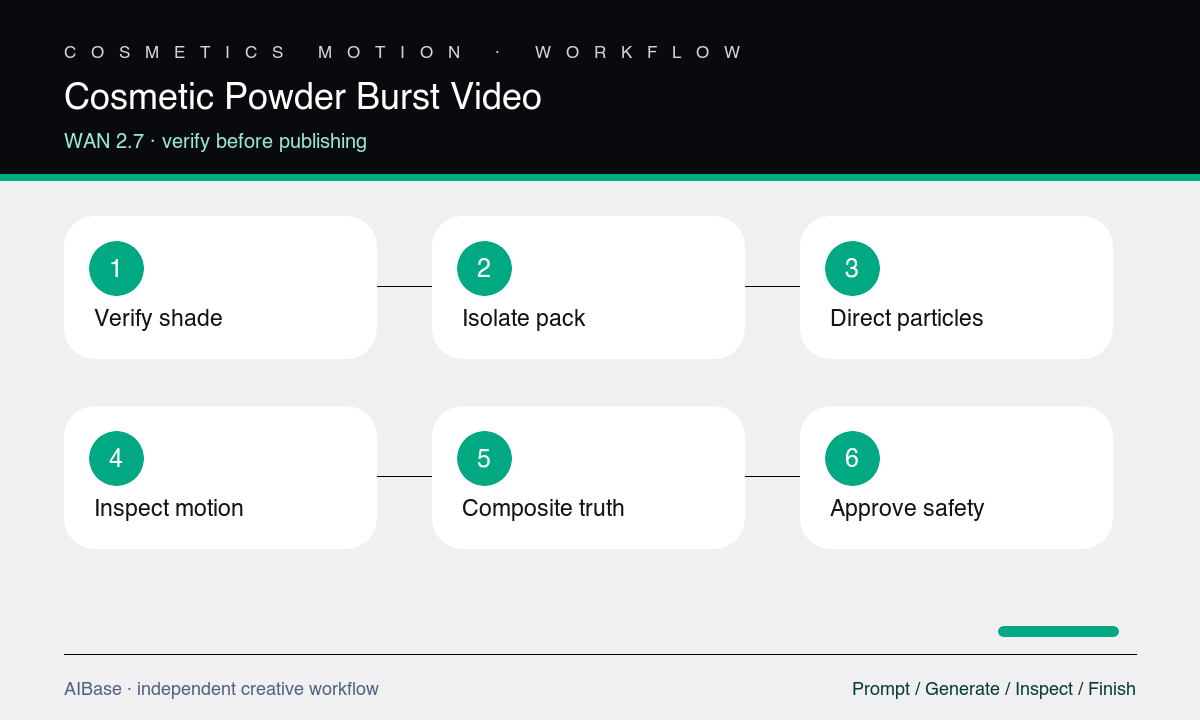
- Record the exact SKU, package construction, pan or sifter layout, included tools, net-fill visual, shade standard, finish, approved claims, and reference rights.
- Decide whether the powder event is a background plate, edge release, brush tap, or surface sweep, and define origin, trajectory, density, duration, and settle frame.
- Generate a particle-only or lightly product-led test with a locked camera, keeping the product outside the particle path when package fidelity is critical.
- Inspect shade, particle scale, gravity, turbulence, density, package edges, logo zone, pan fill, reflections, shadow, contamination, and temporal flicker.
- Composite the approved packshot over the selected particle plate, add controlled shadow interaction, then apply editable logo, shade name, copy, and CTA.
- Review cosmetics truth, safety implication, claims, air quality, retouching disclosure, channel crop, captions, and destination SKU before publishing.
Example prompt variants
- Five-second locked compact shot with a narrow veil of verified rose blush powder passing behind the closed approved compact from lower left to upper right, fine particles settling, preserve case, hinge, logo zone, finish, shadow, and shade.
- Four-second macro of the approved loose setting-powder jar with a tiny controlled puff rising only from two sifter holes then dispersing, preserve hole count, fill level, translucent lid, neutral shade, label zone, light, and no face.
- Six-second square pigment plate with the approved eyeshadow pan stationary and a soft crescent of matching powder sweeping around—not over—the pan, slow overhead camera drift, preserve pan geometry, embossing, undertone, texture, and clean end frame.
Quality checklist
- Package silhouette, construction, lid, hinge, pan or sifter count, applicator, logo, label zones, materials, finish, colorway, and shadows remain stable.
- Powder hue, undertone, particle size, density, origin, trajectory, dispersion, gravity, and settling are plausible and match the verified product shade.
- Particles do not turn into smoke, liquid, glitter, sparks, cloth, duplicated product, contamination, or an unsafe inhalation or eye-contact scenario.
- The edit does not imply waterproofing, clean ingredients, coverage, wear time, skin benefit, safety, or performance beyond approved claims.
- Approved packshot, shade reference, compositing boundaries, disclosures, copy, CTA, captions, and destination SKU pass final review.
Mistakes to avoid
- Prompting an explosion without specifying particle scale, source, direction, density, speed, gravity, and a finite settling point.
- Letting particles cross the product until the model changes the compact, pan count, logo, label, fill level, or verified shade.
- Using dense airborne powder around a face or hand in a way that implies unsafe inhalation, application, or hygiene.
- Treating a generated pigment color as accurate without comparing it to the physical shade standard and approved packshot.
Related AIBase pages
- Open Wan 2.7 image-to-video
- Create cosmetics texture video
- Animate perfume mist
- Create skincare launch films
Practical next step
Open the most relevant AIBase generator, run one narrow prompt first, and save the best result before adding more constraints. The fastest way to improve output quality is to compare one variable at a time: subject, camera, background, lighting, then final polish.