
Best AI Model Workflow for Restaurant Launch Creative Across Images and Video
Route restaurant launch concepts across Seedream 5.0 Lite, GPT Image 2, Nano Banana 2, Seedance 2, Veo 3.1 Fast, and Wan 2.7 while keeping menu facts and food imagery truthful.
Quick answer
Use a routed stack instead of one model for everything: Seedream 5.0 Lite for rapid text-free directions, GPT Image 2 for bounded scene concepts, Nano Banana 2 for local edits to authorized photos, Seedance 2 for short source-led food or space motion, Veo 3.1 Fast for low-risk social transition plates, and Wan 2.7 for one controlled food-motion detail. Keep the real dishes, portions, ingredients, prices, hours, address, people, reviews, and claims in approved capture and editable layers.
Who this guide is for
Independent restaurants, hospitality groups, chefs, launch agencies, photographers, and social teams building a coordinated opening campaign across website, listings, email, print, and short video.
Recommended model
| Use case | Recommended model | Why |
|---|---|---|
| This workflow | A routed stack: Seedream 5.0 Lite and GPT Image 2 for concepts, Nano Banana 2 for bounded edits, Seedance 2 and Wan 2.7 for source-led motion, and Veo 3.1 Fast for social plates | Each model handles a narrower production job, reducing the risk that menus, dishes, interiors, people, branding, or launch facts drift across independently generated assets. |
AIBase is an independent creative platform. Model names are shown only to identify supported underlying technologies and workflow choices.
Prompt template
Create one text-free [concept background / bounded photo edit / 3-5 second illustrative motion plate] for the verified restaurant launch campaign. Asset job: [specific channel and purpose]. Truth source: [approved menu photo / interior photo / brand palette / empty background brief]. Preserve or reserve exact zones for [dish, logo, headline, date, address, CTA, disclosure]. Visual direction: [palette, camera, light, one motion if video]. Do not invent or change a dish, portion, ingredient, garnish, allergen, chef, customer, interior, hygiene condition, award, review, price, offer, hours, address, reservation availability, logo, text, or claim.
Step-by-step workflow
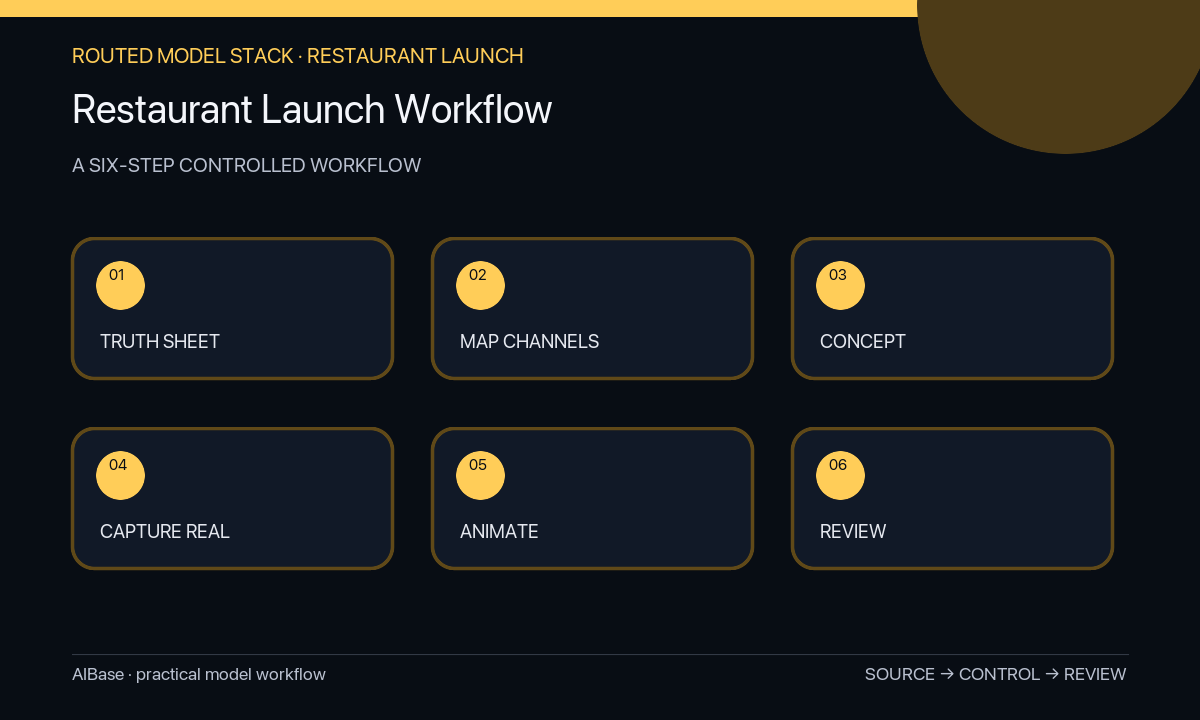
- Build one launch truth sheet with current menu, dish names, ingredients, allergens, portions, prices, offers, opening date, hours, address, booking link, brand assets, people rights, claims, reviewers, and expiration rules.
- Create a channel matrix for website, maps and listings, email, print, organic social, paid social, and in-venue screens, naming each asset job, format, factual fields, source, owner, and deadline.
- Use Seedream for broad text-free directions and GPT Image 2 for selected scene or layout concepts; do not let either create a menu item, restaurant interior, chef, customer, review, award, or factual overlay.
- Capture real hero dishes, portions, team, venue, signage, and service details, then use Nano Banana 2 only for approved local corrections that do not beautify food or condition beyond truth.
- Use Seedance or Wan for one source-led micro-motion and Veo Fast for non-evidentiary social transitions; add exact copy, pricing, dates, address, booking CTA, captions, and audio in post.
- Run culinary, operations, brand, legal, accessibility, platform, destination, and expiration review; publish from a master asset ledger and update every channel when a fact changes.
Example prompt variants
- Text-free square restaurant launch background, warm terracotta and cream editorial blocks, exact food-photo zone center, quiet opening-date and address zones, no dish, interior, chef, diner, logo, review, award, price, word, or number.
- Bounded image-to-image edit of the authorized signature-dish photo: remove only the masked stray crumb outside the plated composition, preserve exact portion, ingredients, garnish count, color, moisture, plate, shadows, table, crop, and every unmasked pixel.
- Four-second source-led motion from the approved soup photograph: only the existing steam rises subtly, locked camera, preserve dish volume, ingredients, garnish, bowl, table, background, and no new heat, hand, utensil, text, or aroma claim.
Quality checklist
- Menu names, dishes, portions, ingredients, allergens, prices, offers, opening date, hours, address, booking link, and availability match current operations.
- Food, interiors, team, customers, signage, service, cleanliness, views, awards, reviews, and claims use authorized truthful sources when presented as evidence.
- Every generated asset has one channel job and preserves the campaign palette, photo zones, copy hierarchy, mobile-safe center, caption room, and disclosure needs.
- Logos, menu copy, price, date, address, CTA, allergen note, legal text, ratings, and platform metadata remain exact editable layers.
- Truth-sheet versions, source rights, prompts, edits, approvals, exports, destinations, publication dates, and retirement actions remain traceable.
Mistakes to avoid
- Generating fictional signature dishes, portions, interiors, chefs, crowds, awards, or reviews and using them as launch evidence.
- Assigning one model to every asset and allowing food, palette, venue, price, date, or brand identity to drift across channels.
- Baking menu details, allergens, prices, opening hours, address, booking link, offer terms, or claims into generated pixels.
- Publishing on schedule without checking operational readiness, destination accuracy, accessibility, local advertising rules, and expiration across every channel.
Related AIBase pages
- Create restaurant social image concepts
- Animate approved menu photos
- Create daily special reels
- Create food motion details
Practical next step
Open the most relevant AIBase generator, run one narrow prompt first, and save the best result before adding more constraints. The fastest way to improve output quality is to compare one variable at a time: subject, camera, background, lighting, then final polish.