
Veo 3.1 Fast Customer Testimonial B-Roll Prompts without Fake Endorsements
Prototype testimonial-supporting B-roll with Veo 3.1 Fast while keeping real speakers, quotes, product behavior, results, interfaces, and disclosures controlled.
Quick answer
Use real, consented interview footage for the customer and exact quote. Generate only clearly illustrative cutaways that do not impersonate the speaker, recreate a claimed event, show invented product proof, or imply measured results. Good synthetic B-roll can establish mood, category context, or an abstract transition; exact interface use, before-and-after evidence, facilities, employees, and customer outcomes should come from authorized capture or controlled assets.
Who this guide is for
B2B marketers, SaaS teams, agencies, founders, and video editors assembling customer stories, case-study clips, sales videos, or paid-social cutdowns from approved interviews.
Recommended model
| Use case | Recommended model | Why |
|---|---|---|
| This workflow | Veo 3.1 Fast for low-risk B-roll exploration, with real footage for people, quotes, products, and evidence | Fast iteration is useful for trying short visual bridges and atmospheric plates, provided the testimonial truth remains in authorized source footage and every synthetic shot has a defined non-evidentiary role. |
AIBase is an independent creative platform. Model names are shown only to identify supported underlying technologies and workflow choices.
Prompt template
Create a [3-6 second] clearly illustrative B-roll plate supporting the approved customer-story theme [theme], not depicting the real customer or claimed event. Subject: [generic non-identifiable object or environment]. One action: [specific]. Camera: [one move], composition: [crop and copy-safe zone], light: [one setup], stable final second. Avoid identifiable or lookalike people, customer offices, employee uniforms, exact product UI, logos, company names, quotes, captions, metrics, dashboards, documents, transactions, medical or financial results, before-and-after proof, review stars, awards, partner marks, or text. Do not imply that the generated scene is documentary footage. Return a neutral plate for an editor to label and place beside approved interview content.
Step-by-step workflow
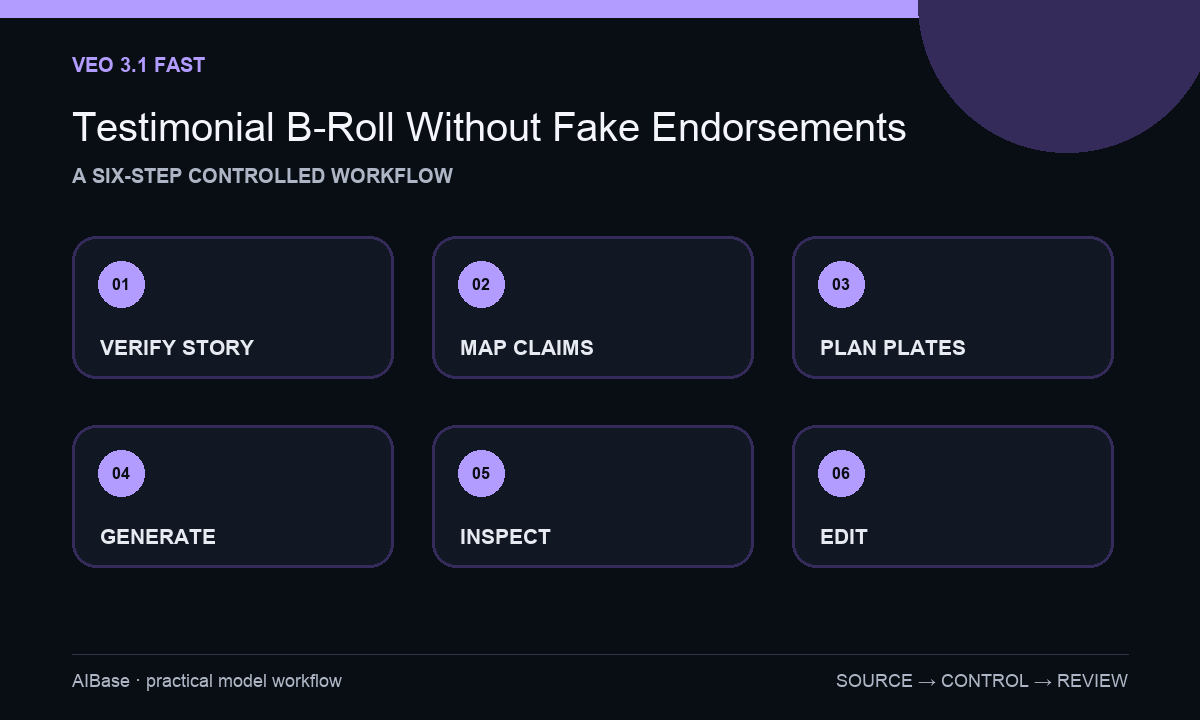
- Secure speaker consent, usage scope, quote approval, customer name and logo permission, claim substantiation, disclosure needs, expiration date, and a removal or correction contact.
- Transcribe the approved interview and mark each statement as opinion, experience, product fact, measurable result, sensitive claim, or contextual narrative; remove or qualify anything unsupported.
- Build a shot map that assigns real interview, authorized customer footage, exact product capture, licensed stock, controlled graphics, or synthetic illustration to each sentence.
- Generate only low-risk abstract or environmental plates with one action and no identifiable person, customer location, product proof, metric, interface, logo, or factual overlay.
- Review frames for accidental lookalikes, false settings, impossible product behavior, invented screens, sensitive documents, brand marks, readable text, misleading cause-and-effect, and continuity.
- Edit the approved quote without changing meaning, keep disclosures legible, add exact captions and product graphics in post, record synthetic shots, and route the final cut through customer and legal review.
Example prompt variants
- Four-second abstract productivity transition, organized paper cards move from a scattered edge into three clean lanes on a neutral desk, overhead camera locked, no hands, screen, logo, metric, document text, or implication of customer results.
- Five-second generic early-morning office atmosphere with empty worktable, soft window light gradually brightens and one monitor-shaped silhouette remains blank, slow push-in, no people, company identity, interface, message, graph, or customer-location claim.
- Three-second service-workflow metaphor, one unbranded parcel moves smoothly from an input zone to a clearly separated output zone in a minimal studio, no warehouse claim, label, employee, speed metric, delivery proof, or text.
Quality checklist
- The real speaker, approved quote, consent, context, usage, and expiration remain intact and the edit does not change meaning.
- Synthetic B-roll is non-identifiable, non-evidentiary, and cannot be mistaken for the customer, their workplace, product use, or documented outcome.
- Product UI, logos, metrics, claims, screenshots, documents, results, captions, and disclosures use exact approved sources and editable layers.
- Shot order does not create a causal implication stronger than the customer’s verified statement and supporting evidence.
- Transcript, consent, claims, source map, prompts, outputs, disclosures, approvals, final cut, and correction path remain traceable.
Mistakes to avoid
- Generating a convincing customer lookalike delivering an invented quote or reenacting an event that was never filmed.
- Showing synthetic dashboards, transactions, health changes, revenue graphs, busy facilities, or product results as testimonial proof.
- Placing generic B-roll directly over a claim so the edit implies the generated scene documents that exact outcome.
- Trimming a qualified statement into an absolute endorsement or publishing after consent, logo rights, claim evidence, or usage term has expired.
Related AIBase pages
- Open Veo 3.1 Fast
- Create UGC ad video prompts
- Create SaaS feature announcement videos
- Build social ad storyboards
Practical next step
Open the most relevant AIBase generator, run one narrow prompt first, and save the best result before adding more constraints. The fastest way to improve output quality is to compare one variable at a time: subject, camera, background, lighting, then final polish.